
One model for the whole company
Customers, assets, contracts, documents and costs in the same database. Reports and dashboards you can edit, plus API v4 and MCP so your systems can read and write.
See the technologyChoose which cookies you accept. You can change this at any time from “Cookie settings” in the footer of every page. Cookie policy
They make the website work, remember this choice, keep your conversation with the assistant if you use it, and protect the forms from bots. They cannot be turned off.
Google Analytics 4 measures statistically how the website is used. During your visit we also remember the campaign source you arrived with and the page you landed on, so we know which campaigns and pages bring us requests. Cloudflare Web Analytics counts visits without cookies and does not depend on this option.
Google Ads measures which requests reach us from our ads (conversions), without your name, email or phone number. It is not loaded until you accept this category.
AI-native cloud platform
attendo is the new generation of AI-native cloud software. It connects to the programs you already use and brings together the information, the conversations and the processes of every department. You add the modules you need, and marIA, the AI built into every layer, works with all of it, under your control.
Laptops for the Engineering team
Send the order to Supplier A for delivery on Friday.
Connects with what you already use
The problem
The request came in by WhatsApp, to someone’s phone. The approval, in an email thread. The signed document, in a shared folder. The follow-up, in a spreadsheet only its author understands. And the invoice, in the ERP.
Every tool works. None of them knows what the one next to it is doing. At month-end someone reconciles by hand what should never have been split up. And the question that matters, where is this and who has it?, gets answered with a round of phone calls.
The problem is not your tools. It is that the same matter lives in five places.
Outside the system, one case lives in 9 places: stray spreadsheet, messaging group, sticky note with a reminder, approval in an email thread, scanned service report, shifts in another spreadsheet, materials in a notebook, unlogged call, message to a personal phone.
Inside attendo, the documents (xls, note, pdf, shifts, list) are linked to their step in the flow (Intake, Triage, Dispatch, Execution, Signature, To your ERP) and the conversations stay on the case: conversation on the case, approval on the record, call linked to the case, message in the inbox.
Outside the system
This is how one case is scattered today
A spreadsheet, a message group, an unanswered email and a sheet of paper in the van. Each one holds a piece, and none of them knows about the others.
Inside the same case
And this is how it looks in attendo
Each document is linked to the step where it is used, and conversations stay in the history. Your customers keep writing wherever they always have.
The platform
Everything in attendo rests on three layers that share the same data model. That is why the AI sees the full context, not a fragment.
Customers, assets, contracts, documents and costs in the same database. Reports and dashboards you can edit, plus API v4 and MCP so your systems can read and write.
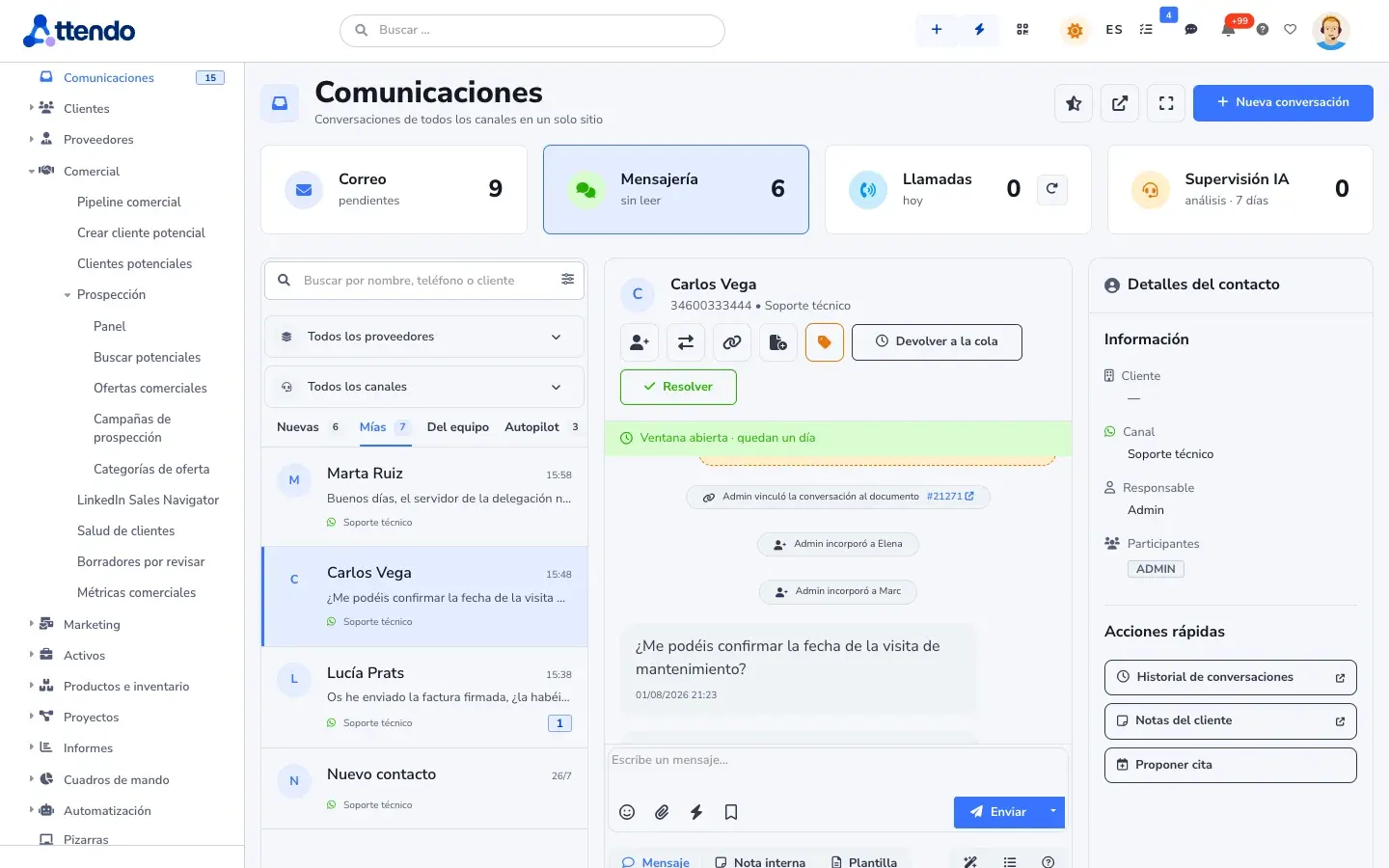
See the technologyEmail from Microsoft 365 and Google, WhatsApp, phone, web chat, portal and QR forms create and feed the same document. Teams or Meet meetings are scheduled from the record. And your customers, suppliers and partners sign in to their own portal, with your brand, one per business line if you need it and no license cost. Nobody asks the same thing twice.
See communicationsVisual flows, phased processes with approvals, SLAs on your business calendar and agents that prioritize. No code.
See automationIn your data, it answers questions in plain language. In communications, it writes the draft. In processes, it draws the flow you describe and scores what is urgent.
See the attendo AISolutions
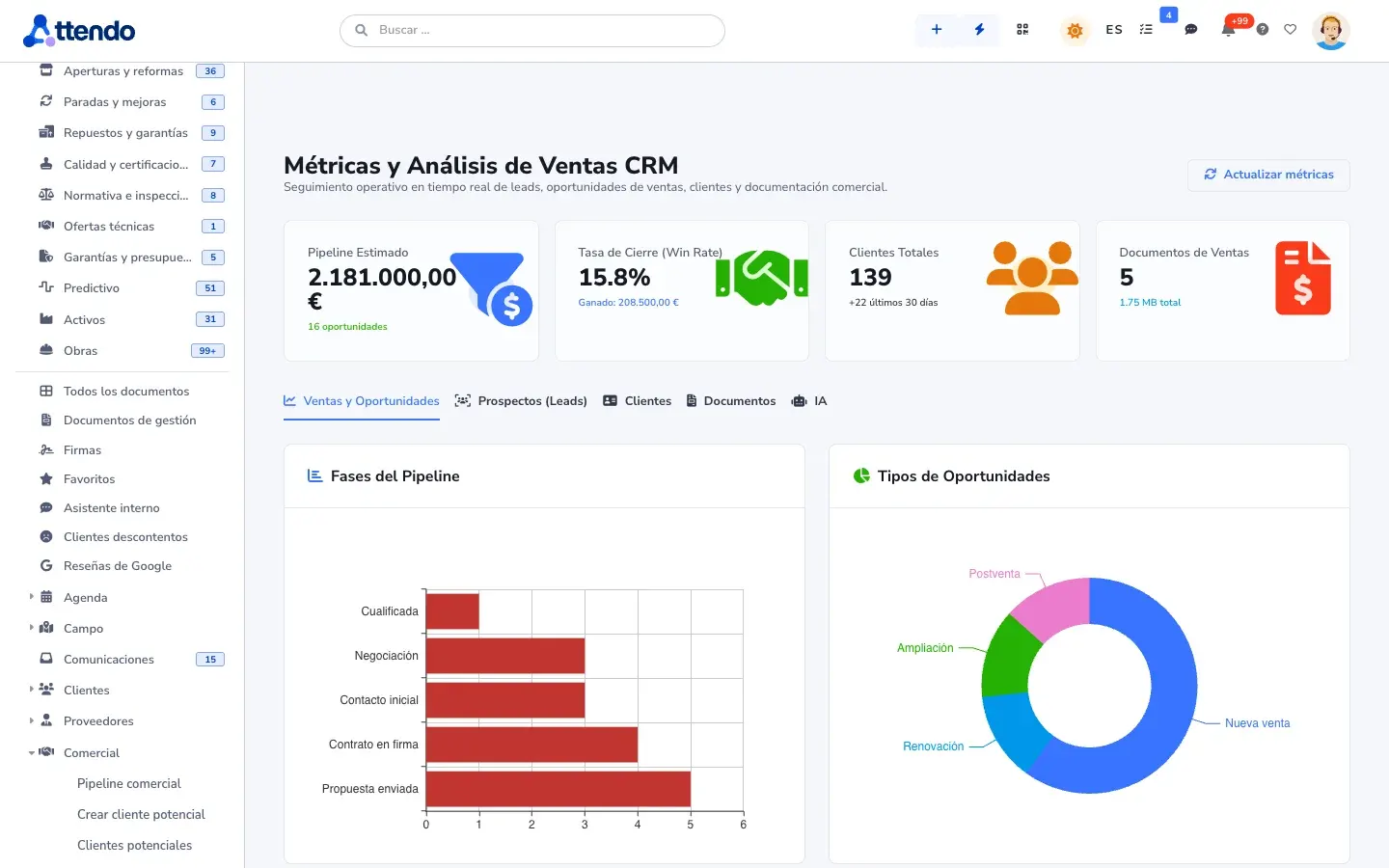
attendo is one platform. Depending on the modules you turn on, it becomes the CMMS for your maintenance, the CRM for your sales team, your customer care, your projects or your processes. There are nine solutions, and you add modules the day you need them, without migrating anything.
The platform
Modules for maintenance
The platform
Modules for sales
The platform
Modules for field work
The platform
Modules for repair and after-sales service
The platform
Modules for support and help desk
The platform
Modules for customer care
The platform
Modules for project management
The platform
Modules for process automation
The platform
Modules for regulatory compliance
The idea
In attendo, a ticket, a work order, a nonconformity or a purchase request are the same document. Only the type changes. The fields change, and so does who works on it. The engine is the same.
The document
The type changes. The engine stays the same.
Same timeline, same statuses, same search, same reports. Nothing to reconcile.
Who it’s for
For any team that works with requests, approvals, reviews and deadlines. Each department sets up its processes with the same building blocks, with no custom development.
Quality control
Nonconformities live in a spreadsheet, corrective actions in email and evidence in a shared folder. When the audit comes, someone rebuilds the story by hand.
Diameter out of tolerance in batch 2291
Human resources
Every new hire depends on someone remembering to tell IT, order the equipment and sign the paperwork. Employee requests arrive by email, in the hallway and over chat.
Joining the Lab team
Regulatory compliance
The whistleblowing channel is an email inbox, controls are reviewed in a spreadsheet and the evidence is scattered. When someone asks, nobody can show the full trail.
Possible conflict of interest in a purchase
Engineering and projects
Planning lives in a separate Gantt chart, changes are approved by email and nobody knows which drawing revision is the right one. The project margin shows up at month-end close.
Replace the frame bracket with version B
Finance and administration
Admin staff copy the sales rep’s order by hand, chase deposits by phone and approve expenses by email. Contract expirations are discovered after they have passed.
Per diem and mileage for the North Plant visit
Purchasing
Requests arrive by email without enough detail, approvals get lost and the order is placed in another tool. When the material arrives wrong, nobody can find who ordered it.
Bearings and belts for Line 2
Internal IT and employee help desk
Support is requested by email, over chat and in the hallway. New user setups always miss something and nobody knows which laptop each person has.
Laptop cannot connect to the VPN
Legal and contracts
Contracts are negotiated by email, signed on paper and stored in folders. The automatic renewal is discovered when there is no time left to stop it.
Master services agreement with Supplier B
Modules
attendo has 130 modules and features, and you turn on only the ones you use. Every module works on the same record, so they combine without integrations between them.
Flows, phased processes with approvals, and AI inside the flow
Micro-agents that score and prioritize. You take the wheel.
It suggests and assigns. A person decides.
All activity on the document, in order, with its author and channel
Laptops for the Engineering team
E-signature for the quote or the contract, right from its record
Service contract
Inspections with photo, signature and location, closed on site
Checklist · Safety inspection
Email, WhatsApp, Teams, Meet, web chat and phone, channel by channel
One single record
WhatsApp “What time are you coming?”Teams Message from the supervisorCall Transcribed and summarizedQuotes with options that the customer opens, picks and accepts
Your quote · Office maintenance
Ask in plain language. Get answers from your data, with the source.
SELECT supplier, COUNT(*) … GROUP BY supplier Plan projects and construction jobs with dependencies and a baseline
marIA (Smart-AI), the attendo AI
marIA drafts, classifies, scores and summarizes inside your operation. Every operation records who launched it, what it did and what it cost, within the monthly budget you set.
It drafts with the customer’s history in front of it. It classifies incoming email. It scores the lead and the urgency of a breakdown. It summarizes the technician’s voice note.
Anything going out to a customer waits for your approval by default. You accept, correct or discard. And you can turn AI off module by module: attendo keeps working in full.
Every operation records user, model and cost. You set a monthly cap per provider and, when it is reached, the AI stops. With your own key for OpenAI, Gemini, Anthropic, Mistral, Scaleway, Microsoft 365 Copilot, OpenRouter or ElevenLabs. Or with Jev AI, built in: structured answers, with fewer inaccuracies and lower cost.
Your AI, your provider, your bill, your control. See everything marIA does
Customization
You define your document types with their fields, screens, colors and flow. You call things what your team calls them. It all lives in configuration, not in custom code, so when attendo updates, your setup is still there.
Report an issue
Send Ticket TK-2490 createdConnects with what you already have
Your accounting stays where it is. attendo runs the operation and passes your ERP what it needs: customers, quotes, delivery notes and hours. The invoice is issued by your connected ERP, with its numbering, because attendo is not an ERP or accounting software.
Yours is not on the list? Documented API v4, webhooks, and MCP as both server and client. See all integrations
Trust
Managed cloud in a European region of AWS, OVHcloud or Google Cloud, with a database of its own for your company. As a project, on your own infrastructure.
Sign-in with Microsoft, Google or Auth0, two-factor authentication and an access log.
Each person sees only what they should, also by field value, on every screen.
Hosting, encryption, backups, access and logging, in writing and verifiable. We walk you through them on a technical call.
Full export. If you leave one day, you take it with you.
Where your data is, who can access it and how you take it with you, on the security page.
Frequently asked questions
That the AI is not a module bolted on top. It lives in the record, in the channels, in the flows and in the reports, and it works on the same data model as your team. That is why its proposals have context, and why it is governed from one place: provider, budget and log.
Yes. Quality, HR, purchasing, compliance or legal work the same way: with document types, flows, checklists and e-signature that you configure without writing code. See it in the use cases.
No. attendo is modular and you turn on what you use. Most companies start with one area and turn on the rest when they need it, without migrating anything.
Yes. attendo does not replace your ERP: it connects to it. And it can run alongside the tools you already use while you bring everything together step by step, with connectors, API and webhooks.
Yes. AI is optional and you turn it on module by module. With no AI provider, the whole platform works.
No. attendo does not train models on your data: the AI reads your documents at the moment it answers. It connects to the provider you choose with your own key, and that provider’s terms apply. If you need your data to stay in Europe or inside your organization, you can use Scaleway or your Microsoft 365 Copilot.
In the European Union, in a database of its own for your company. attendo is a SaaS service: we run it in a European region of AWS, OVHcloud or Google Cloud. As a project, it can also be installed on-premise, on your own infrastructure. All the details are on the security page.
It depends on how many modules you turn on, and it is done in phases. The demo, on the other hand, is prepared with your operation, not with generic data.
Request a demo
Tell us what you want to solve and we will show you attendo with your ticket types, your assets and your customers. If it is not a fit, we will tell you.
Would you rather talk first?