
attendo Field Service
The service report closes on site. Not on Friday.
Your technicians arrive with the equipment history in hand, document the job with checklists and photos, and the customer signs before they leave. Hours and materials are logged on the spot, not from memory.
- App for iOS and Android, offline too
- A QR code on every asset
- Service report as a PDF with your branding
If this sounds familiar, keep reading
No service report, no invoice. And then it is Friday.
The technician does the job on Tuesday. The paper report rides around in the van until Friday, in whatever handwriting survived. The back office types it up on Monday. And the invoice goes out two weeks later, if someone remembers the hours.
- Report missing
The report arrives late, or never
And with no service report, there is no delivery note and no invoice.
- Hours not logged
Hours and materials from memory
What is not logged on the spot never gets billed.
- No signature
No photo or signature, and you lose the argument
The customer says it was not done, and you have nothing to prove otherwise.
- Unassigned
The schedule lives in a WhatsApp group
Nobody knows who is going where or what was left pending.
Who it is for
For maintenance contractors, installers and repair services with technicians on the road
For companies whose technicians travel to their customers’ sites or equipment: they plan the visit, do the work on site and close the service report there. It works in any industry: these are the most common.
Do you need to receive and organize service requests from all your channels, with their SLAs? That is attendo Ticketing, the help desk. Field Service starts when a request needs a technician on site, and both share the customer, the equipment and the history. Managing several sites, with their own requests and suppliers? See Facility Management.
Industries
Types of business
- Companies that maintain their customers’ assets
- Installers with projects, commissioning and after-sales
- Authorized and independent repair services
- IT service and support providers
How it works
A working day, from schedule to payment
Six steps, in the order they happen.
- Step 1
You plan
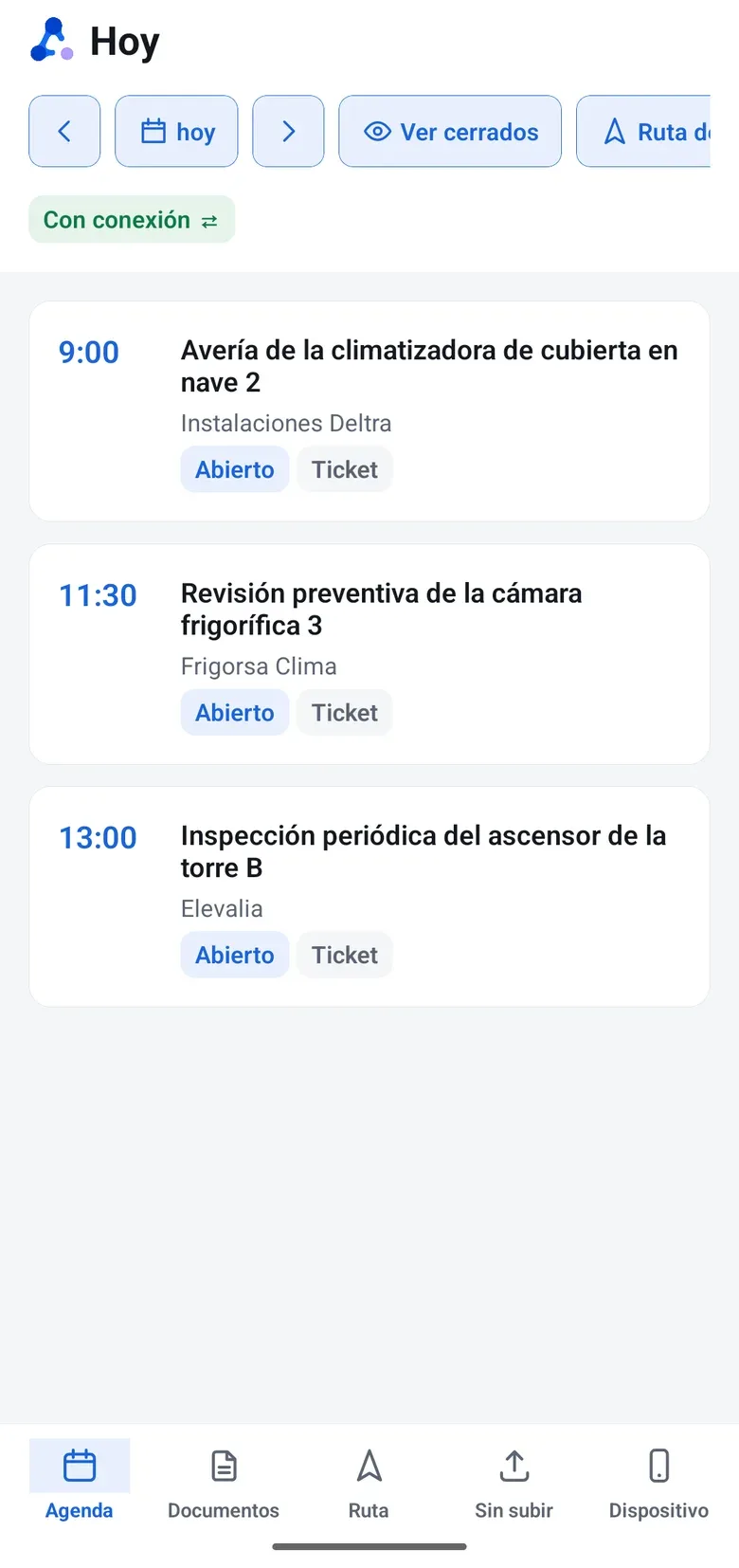
A schedule per technician and per group, on their real working hours, with vacations and holidays. Each visit with its time window and address.
- Step 2
The technician sees their day
Their queue on the phone. They pick up work from the group when it is their turn, and the customer gets a notice that they are on the way.
- Step 3
They scan the equipment QR code
The record opens with the history and the note a colleague left last time.
- Step 4
They document the job
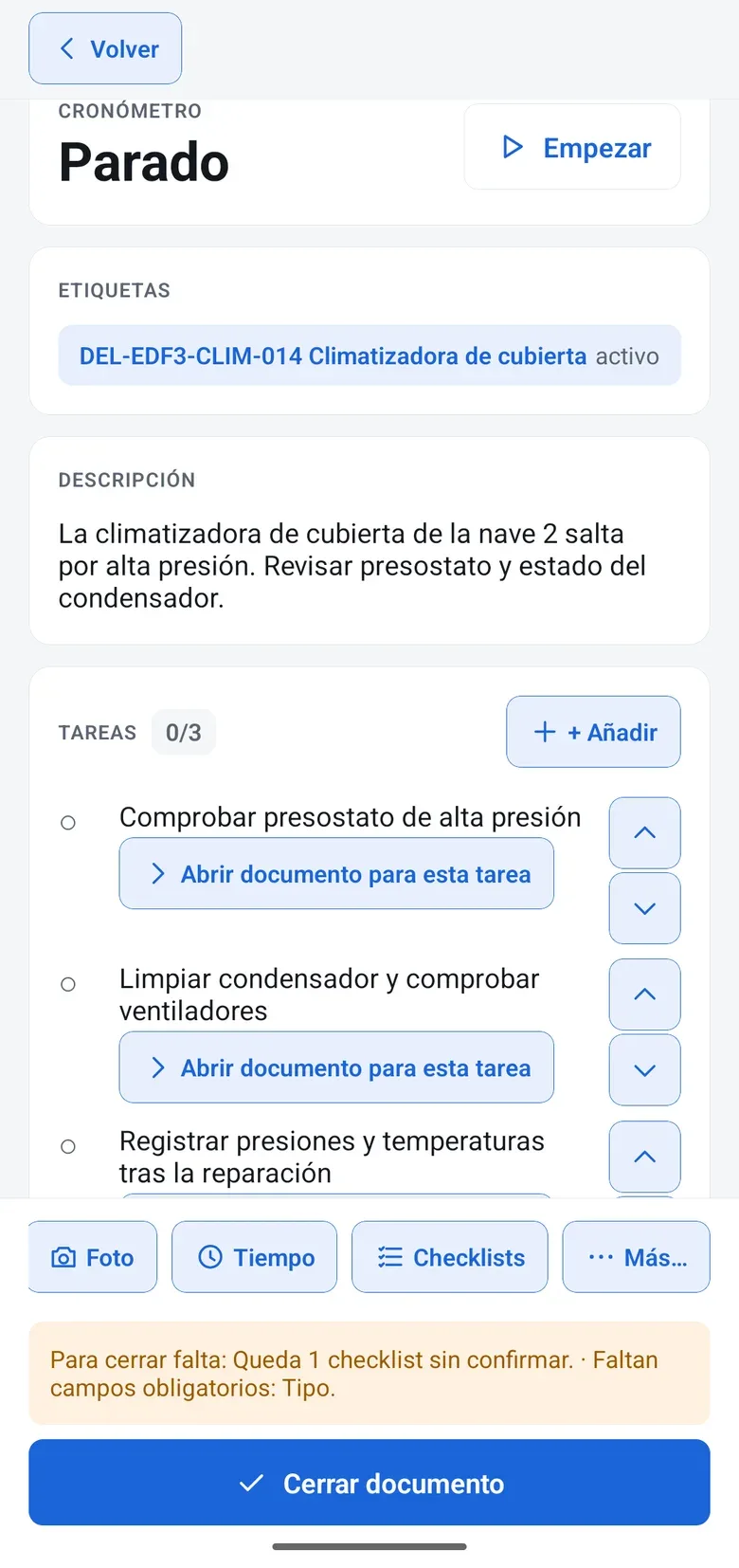
Checklist with before and after photos, readings that raise an alert if they are out of range, timer and materials from the van.
- Step 5
The customer signs
On the screen. The service report goes out as a PDF with your branding when the job is closed.
- Step 6
It gets billed
The service report generates the delivery note, your connected ERP issues the invoice and a report tells you which hours are still not invoiced.
The next visit to this equipment starts with this report
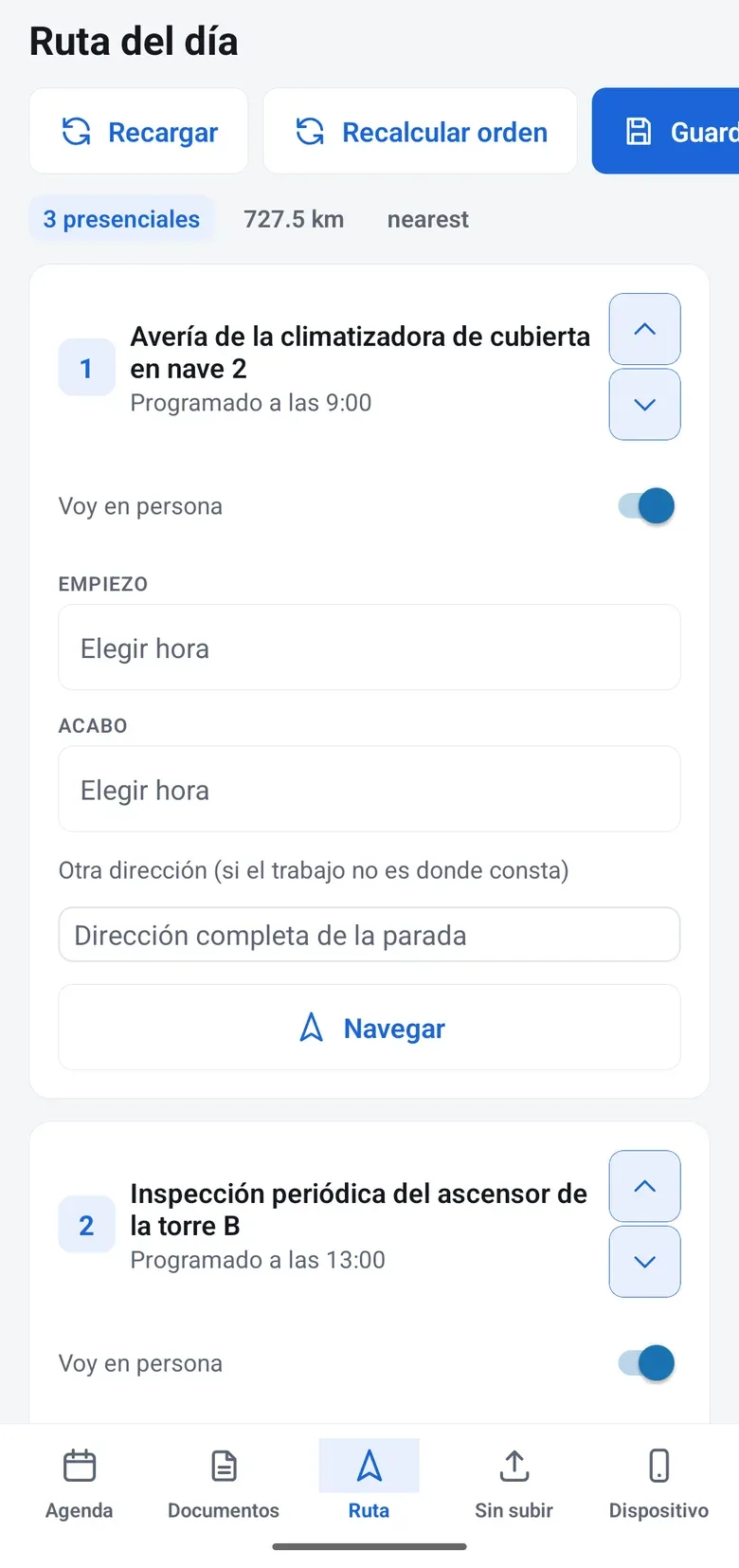
01 The day’s schedule By time, with address and equipment. The stops, in the Route tab.
02 Arrives informed Scans the equipment QR code and sees the last visit and what was recommended.
03 Checklist and photos Tasks, readings, photos and a timer. Offline too.
04 Signed on site The customer signs on the phone and gets the service report as a PDF right away.
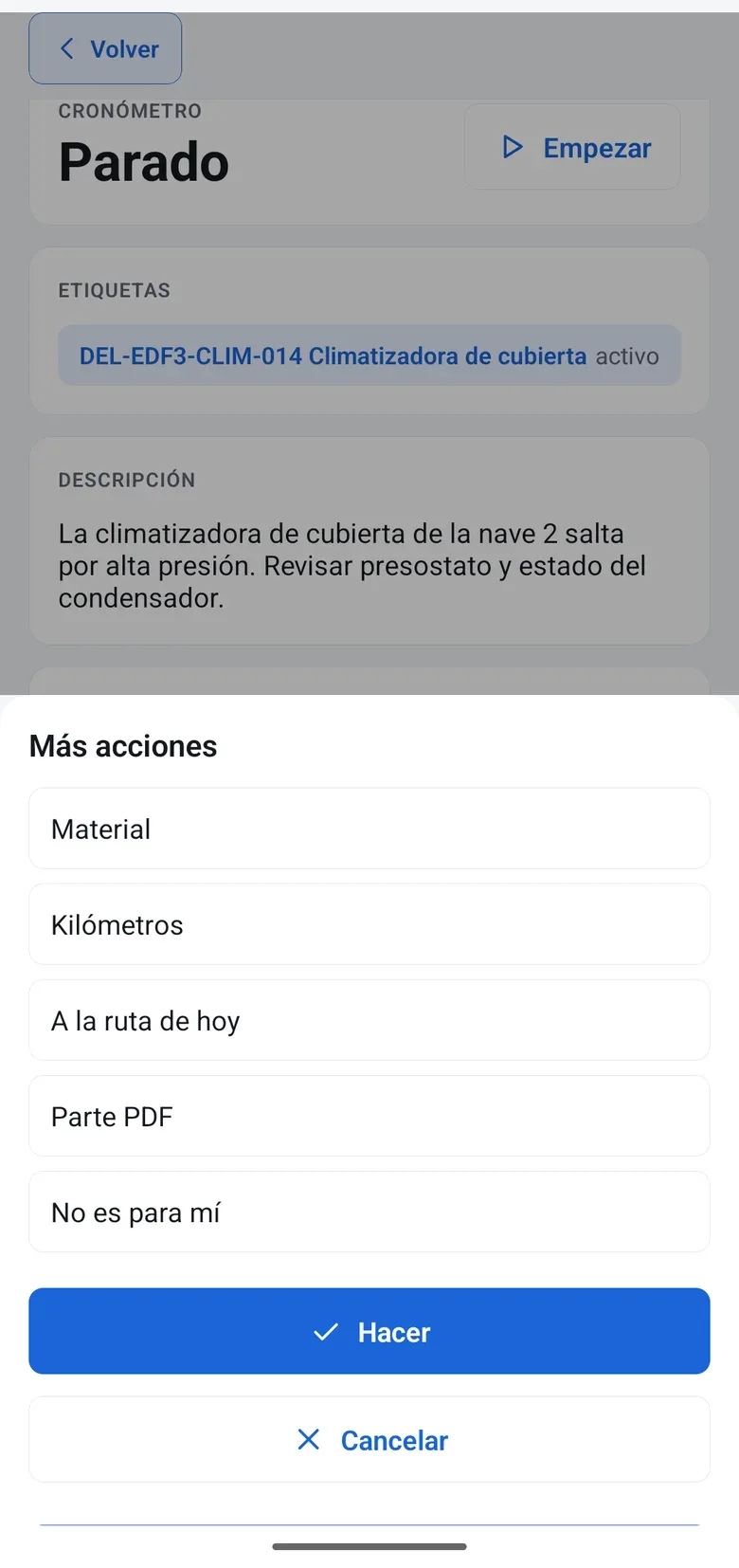
05 From report to your ERP Hours and materials are already in: the delivery note comes from the report and goes to your ERP, which issues the invoice.
The equipment keeps the history of every emergency
01 The request comes in By phone, WhatsApp or the equipment QR code, with the customer identified.
02 Dispatched with Field Radar See who is nearby and who has a free slot in their time window.
03 The conversation, on the case What is said on WhatsApp stays on the report, not on a personal phone.
04 Signed report Checklist, photos and signature before leaving.
05 Ready to invoice The delivery note comes from the report with the actual hours and materials.
With your data
See it with your own service reports and technicians
In the demo we walk through a technician’s day with one of your checklists and the way you assign work today, not a generic example.
On mobile
Built for people with dirty hands
Your technicians work with the attendo app for iOS and Android, offline too. They download their work, do it with no signal and everything syncs when the signal comes back. They see only their own jobs, with big buttons and just the steps they need. What is not needed out in the field, like settings or dashboards, stays in the office on purpose.
- “Take it”: the technician claims the job and colleagues can see it is theirs
- Equipment history and a colleague’s note one tap away
- The day’s route, with stops in the order you choose
- Navigation with Google Maps, Waze or Apple Maps
- Notice to the customer that the technician is on the way
- Secure access with two-factor authentication
App for iOS and Android
Anyone who does not have it installed can work from the phone’s browser, with a connection.
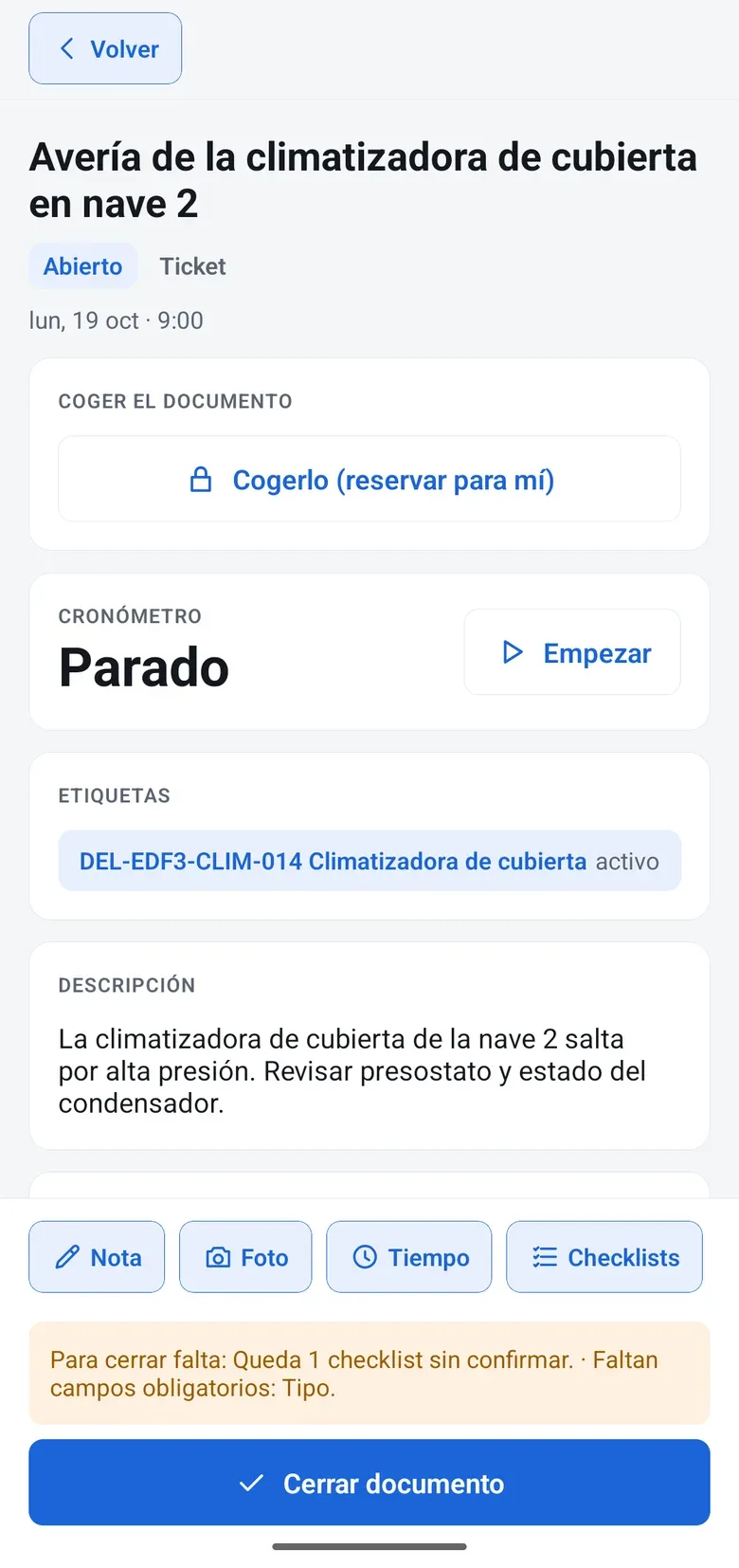
Evidence
Prove what you did
Every inspection is recorded with date, time, author, location, photos and signature, and the document locks when it is closed. If the customer or the insurer asks, the answer is already on the record.
- Free-form checklists: photos, QR scanning, geolocation, values with range alerts and multiple signatures
- Conditional logic and fields that arrive prefilled
- Versions of every template: you know which one each inspection used
- QR forms for people who are not users, one per label
- Your own service report design, and batch printing
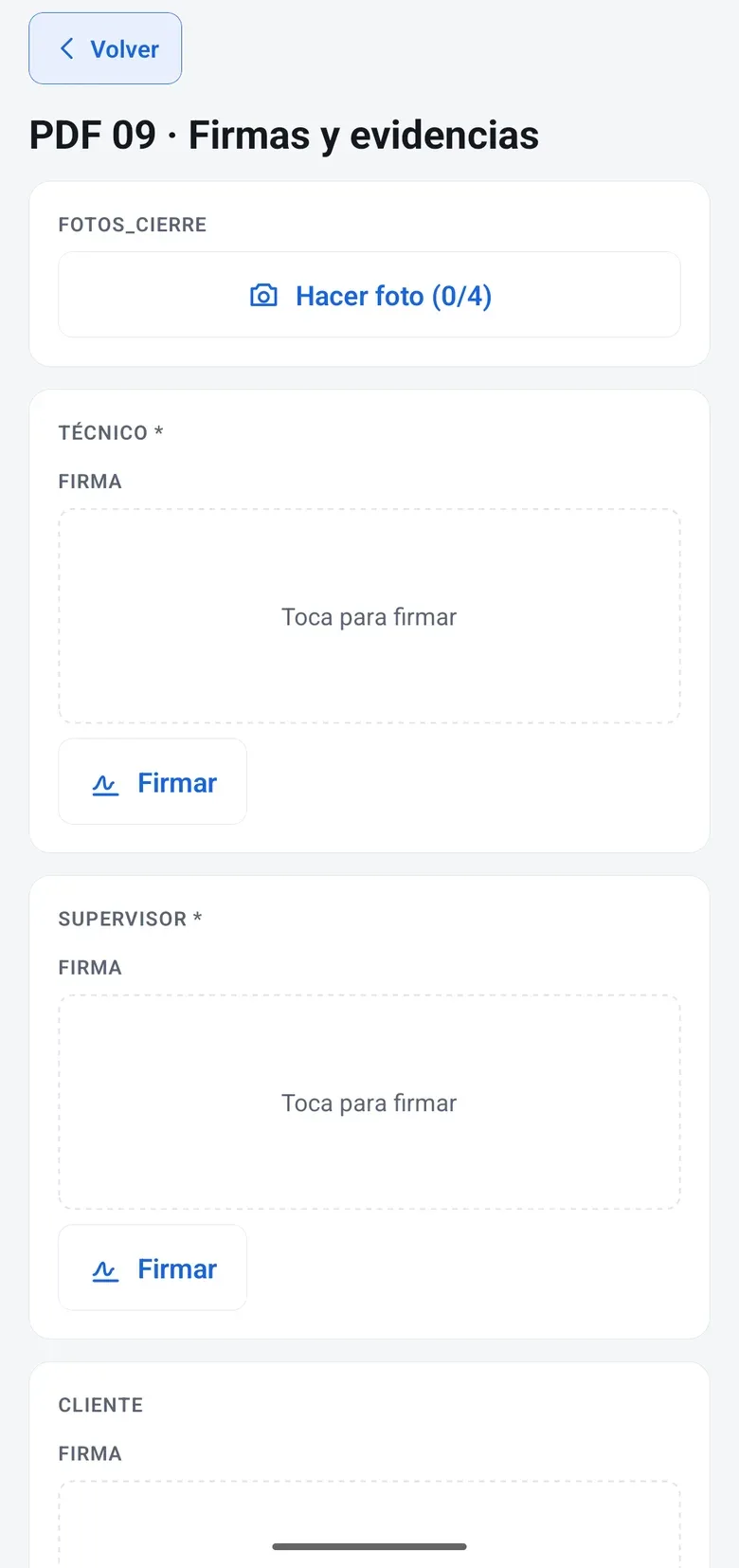
Planning
Who goes where and when, without WhatsApp
Each technician’s schedule is built on their real business calendar. Visits have time windows, on-call duty has shifts and recurring jobs schedule themselves.
And at the start of the day, the attendo Field Service home screen shows how many technicians have the app connected, how many of today’s visits are done and which syncs have failed.
- Schedule and calendar per technician and per group
- Visit time windows and a specific address for each job
- Gantt chart and team workload in the office
- 24-hour on-call shifts and recurring jobs
- Daily dispatch with time windows: the system proposes and a person approves
- Field Radar: the team map with each technician’s status
- Appointments: your agent proposes one or the customer picks a slot on their booking page, with scheduled jobs already taken into account. They reschedule or cancel it from their link
Billing
Get paid for the work you did
The timer counts the real hours, and the van stock only deducts what the technician confirms. Mileage and per diems go on the same service report. The service report produces the delivery note, which goes to your connected ERP to issue the invoice.
- Hours from the timer, not from memory
- Van stock with confirmed consumption
- Hour banks that draw down on their own: on mobile, the technician only picks from the customer’s active contracts
- Unbilled work, activity per technician and first-time fix rate, in their reports and in a dashboard you can edit
- Supplier portal: the subcontractor accepts the job, logs hours and materials and closes it with the customer’s signature
Industry requirements
What customers, insurers and the law ask for
| Requirement | How attendo covers it |
|---|---|
| Evidence of the job | Date, time, author, location, photos, signature, checklist version and lock on close |
| Customer sign-off | On-screen signature with a timestamp. For advanced or qualified e-signature, attendo eSign |
| F-gas logs or fire protection inspections | Checklists that capture the fields (gas, charge, cylinder, signature of the person handling it). Adjusted with your responsible technician |
| Team geolocation | Only during working hours, with staff told beforehand, and by profile |
| Subcontractors | Supplier portal: they accept or decline each job, close it with their report and upload their documents with an expiration date. Expired documents warn, they do not block |
| Hours worked | Time tracking and a timer per service report |
marIA in the field
The voice note, written into the service report
-
Voice note to text
The technician records what they saw and marIA leaves it summarized on the service report, without anyone typing it up.
-
The manual, in the service report
It answers citing the equipment documentation.
-
Clear priorities
On corrective jobs, an urgency score helps decide what goes first. A person decides.
What it does not do: decide what goes first: a person does.
Integrations
What it connects with
Hours, materials and delivery notes go to your ERP, which issues the invoice, through a native connector that is tested first in your test environment. attendo is not an ERP or accounting software. The schedule can be subscribed to from Outlook or Google Calendar, and appointments check your company calendar’s availability and, if they are online, include their Teams or Meet meeting. And the “on my way” notice can go out by email or text message.
Honest comparison
Where it fits (and where it does not)
We would rather you know now than at the third meeting.
| If your team… | attendo Field Service |
|---|---|
| Maintains customer equipment under contract and SLA | attendo Field ServiceThis is its home turf: the service report, the asset and the contract are the same system |
| Installs and then maintains | attendo Field ServiceIt fits: the installation runs as a project and maintenance continues on the same asset |
| Lives on route optimization for a very large fleet | attendo Field ServiceA routing specialist will suit you better |
| Is one or two people | attendo Field ServiceIt is probably more than you need |
Detailed comparisons: attendo vs. Excel. See all.
Calculate with your own numbers how much paper service reports cost you.
The rest of the platform
The rest of the platform, when you need it
Modules used by attendo Field Service
- marIA (Smart-AI)
- Flows and AI-Flows
- AI-Chat and DB Assistant
- Timeline
- Tags and document management
- Business documents
- attendo eSign
- attendo Checklist
- attendo Forms
- attendo Tasks
- Compliance · My team
- Kanban
- Gantt chart
- Scheduling and calendar
- Communications
- Satisfaction surveys
- ERP integration
- Reports and dashboards
- Assets and inventory
- Contracts and SLA
- Customer, supplier and partner portals
- Telephony
- Projects and construction
- Time tracking
- Mobile app and Field Radar
- Appointments and online booking
- Warehouse, purchasing and stock
- Print designer
- API v4, webhooks and MCP
After you request a demo
What happens when you get in touch
A real person from our team replies, and we prepare the demo around your case. No cold calls afterwards.
When we reply
Our hours: Monday to Thursday 9:30 AM to 6:30 PM and Friday 9:30 AM to 2:30 PM, Spain time.
We have emailed you a confirmation that your request arrived. If you do not see it in a few minutes, check your spam folder.
- Today
You tell us about your case
What you want to solve, how many people would use it and what you work with now.
- Next
We agree on a time
We write to you to schedule the demo and, if you like, to ask for a sample of your data: one of your checklists or service reports, and how you assign your technicians’ work today.
- In the demo
You see attendo with your own setup
Your document types, your assets and your customers. And we tell you what fits and what does not.
Frequently asked questions
Frequently asked questions
What is the difference between Field Service and After-Sales?
Field Service coordinates the people who work out in the field: schedule, route, job and signed service report. After-Sales organizes the after-sales service for your customers’ equipment: service request, warranty, quote, part and repair, in the field or in the workshop. In attendo they share customers, equipment and documents.
Do I have to install an app?
We recommend the attendo app for iOS and Android, which works offline. Anyone who does not have it can use the browser on their phone or tablet, with a connection.
Does it work offline?
Yes, with the app. Technicians download their jobs, do them with no signal and everything syncs when the signal comes back, without losing anything. In the phone’s browser, you need a connection.
My technicians are not tech-savvy. Will they use it?
They scan a QR code and see what they have to do. That is fewer steps than the paper service report. And you can try it with one van before switching the whole fleet.
Is the company going to track us?
Location is only used during working hours, staff are told beforehand and each profile sees only what concerns them.
What about my subcontractors?
They come in through the supplier portal, without getting into your internal system. Each job reaches them waiting to be accepted: they accept it and propose a date, which your coordinator confirms, or decline it with a reason. They log their hours and materials without seeing your prices, and the customer signs on their screen. They also confirm your orders and upload the documents you require, with their expiration date.
We work for insurers and property managers. Can they follow their jobs?
Yes, as partners. From their own portal they open and follow the jobs in their portfolio, with what each customer lets them see, and with their brand if you agree.
Does the customer get the service report?
Yes. When the job is closed, a PDF with your branding reaches them by email, with the signature and the photos.
How is it different from Ticketing or a help desk?
The help desk is attendo Ticketing: it receives and organizes service requests from every channel and measures their SLA. Field Service organizes the work on site: schedule, route, job and signed service report. When a request needs a technician, it is scheduled and assigned without copying it into another system.
Request a demo
Try it with one van, not the whole fleet
We set it up with your checklists and your equipment, and one of your technicians uses it on a real route. You decide based on what you have seen.
- With your operation, not a generic demo
- A real person from our team replies
- No cold calls afterwards
Would you rather talk first?
- Phone +34 910 053 530
- Email sales@attendo.me
- Monday to Thursday 9:30 AM to 6:30 PM and Friday 9:30 AM to 2:30 PM (Spain time)