
attendo CRM
The CRM that sees everything that happens with each customer
Customers, opportunities, quotes and contracts on the same platform where your company delivers, serves and supports. For any industry and any size. That is why it knows what you sell, and also what each customer costs you.
- Add a customer in seconds
- Quotes accepted with one click
- AI that scores, you decide
The question nobody answers
Which customer is costing you money?
A standalone CRM knows what you invoiced. It does not know what it cost you. What happens after the sale (deliveries, issues, projects, hours and returns) lives in other programs. And the sales rep walks into the renewal without knowing that this customer uses up more than they pay.
- No next step
A forecast nobody can defend
Opportunities with no amount, no date and no next step. The Monday meeting argues over impressions.
- Contract expired
Contracts that expire without a call
Nobody gives notice in time, and the customer renews with someone else, or does not renew at all.
- Open issue
Sales and operations do not talk
The sales rep sells without knowing the customer has three open issues or a delayed order. Whoever serves the customer does not know what was promised.
- Quote expired
Quotes that expire in silence
They go out as PDFs, nobody knows whether they were opened and nobody follows up.
How it works
From the first call to the renewal
The journey of an opportunity and of a renewal, step by step, on the same customer record.
What you win moves to service with its full history
01 A lead comes in From your website, ads or LinkedIn, with nothing copied by hand.
02 marIA qualifies it Fit, urgency and who to assign it to. The sales rep decides.
03 First contact The first email draft waits in the inbox and goes out when the sales rep approves it.
04 Proposal at stage change When the deal moves to proposal, marIA prepares a draft from your quote.
05 The customer accepts They accept the quote from their phone and the signature stays on the opportunity.
06 On to service The order and the first visit come straight from the won opportunity.
The next renewal starts with this one on the record
01 Expiry alert A flow warns you in good time when a contract is nearing its end.
02 Account health marIA gathers the signals: tickets, ratings and unanswered emails.
03 A timely visit The visit goes on the sales rep’s calendar, with the record at hand.
04 Renewal quote With the contract history and what was discussed at the visit.
05 Renewed Contract, visit and quote stay on the account record.
Customers
One record per customer, with everything in it
Quick add asks for what you decide: the name, the CRM fields, such as business line, industry, source, amounts or expected close, and your custom fields. Required fields cannot be left empty. Then the record fills itself with what happens: opportunities, orders, contracts, projects, issues, hours and every conversation. Each profile sees the part that concerns them.
- Activities in order: calls, emails, WhatsApp and meetings
- Backdated notes that turn into an opportunity
- Master customer and parent supplier for groups, franchises and chains, up to five levels
- Addresses, contacts with job titles, custom fields and tags that lists show and filter
- A portal where the customer sees their invoices, orders and delivery notes, their contracts and what is waiting for their signature
- Partners that serve your customers on your behalf, with their portfolio and their portal
- Import your customer base from Excel or CSV, checked in full before saving
- Leads that are created with their opportunity and join your customer base with “Convert to customer”, keeping the date of the first conversion
- A CRM tab on the customer record, with their open opportunities: stage, amount and expected close
Pipeline
A forecast you can defend
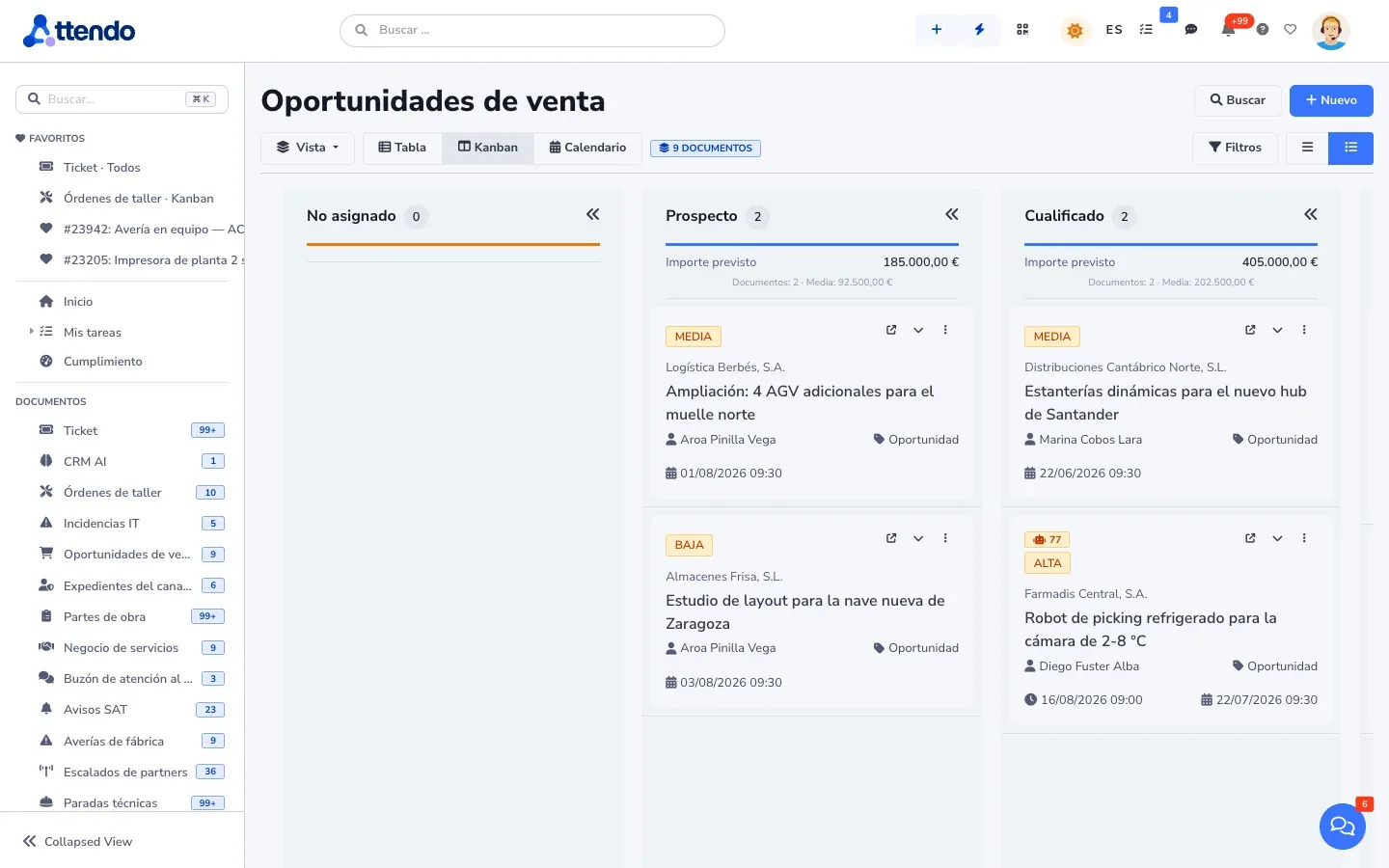
The board totals the amount in each column and groups by sales rep, industry or source. Every opportunity carries an amount, probability, date and competitor, and it cannot be saved without a next action. So none of them stalls without anyone noticing.
There is a single Sales pipeline, by opportunity stage. Moving a card changes the document’s stage.
- Forecast weighted by probability
- Loss reason and competitor on every lost opportunity
- Won/lost report: losing hurts less when you learn why
- Built-in sales cycle, from qualification to handover to operations
- On the opportunity record, the probability with its weighted forecast, which you can change, and the demos and visits listed so you can mark their outcome
- You decide which stages count as leads in the metrics
- Everything sales-related together in the Sales menu: Sales pipeline, leads, prospecting, customer health, drafts to review and metrics, with marketing in its own section
- Google Ads, Meta Ads and LinkedIn Ads campaigns with their ROI, calculated from the opportunities won
It suggests and assigns. A person decides.
Quotes and documents
From quote to delivery note, without retyping
The quote generates the order and the delivery note with linked lines, partial deliveries included. What is billable goes to your connected ERP, which issues the invoice. Nobody copies a line twice.
- Stacked discounts, tax withholding per line, margins and due dates
- Versions and optional lines
- Catalog with images, variants, bundles and tiered quantity pricing
- Quick quote for simple jobs
- Several issuing companies, each with its own numbering series and brand
- Your documents with your design, drag and drop
- Permissions by profile for each business document type: Full, Read only or Hidden, on the web, in reports, the API, MCP and the app
Your quote · Office maintenance
Closing
Accept with one click. And pay the deposit.
The quote is published as a page with your branding. The customer chooses between options, adjusts quantities and accepts or declines without printing anything. You know when they opened it. And the list filters by “Modified by customer”, “Signed” and “Payment”.
- Web quote with options, volume tiers and a secure link that expires
- attendo eSign: advanced or qualified e-signature from the record, with timestamping and recurring signers, and envelopes in their own Signatures menu entry
- attendo Pay: collect the deposit on your own payment gateway, without the card going through attendo
- Bank transfer with proof of payment, and the deposit is requested only once
- In their portal, the customer finds their quotes with their status and validity, without digging up the email
- A countdown to the expiry date, and customer questions that reach the document with an alert in the bell
- The accepted amount goes to its opportunity with “Move to opportunity”
Your quote · Office maintenance
Contracts
No contract lapses because someone forgot
Each contract stores its term, value, SLA and scope, and support and technicians work against it. The renewal is an opportunity with a date, a meeting and tasks. You arrive with the data in front of you, not in the week it expires.
And when the time comes, the next period’s contract comes from the previous one without retyping it. The original stays as it was.
- A list of the whole portfolio with what expires in 30, 60 or 90 days, and an alert beforehand to whoever each item specifies
- Renew or duplicate: the next contract comes from the previous one with its item, price, supplier, tags and fields
- Each contract keeps its files, the signed copy and the annexes, the supplier that services it and who changed what and when
- A sales rep with an assigned portfolio only sees and changes their own customers’ contracts
- A service level with the name you choose, such as Gold or 24x7, shown in the list and in the customer portal
- Hour banks that draw down as time is logged and alert you when they run out. The customer sees their balance in their portal
Annual maintenance · 120 h
- Term
- Until Dec 31, 2026
- Hour bank
- 96 of 120 h used
- SLA
- 4 business hours
- Renewal
- Opportunity open
- Oct 1 · Alert60 days left until renewal
- Oct 1 · marIASummarizes the hours used and the year’s tickets
- Oct 3 · Sales repRenewal meeting on the calendar
Profitability
What you really earn from each customer
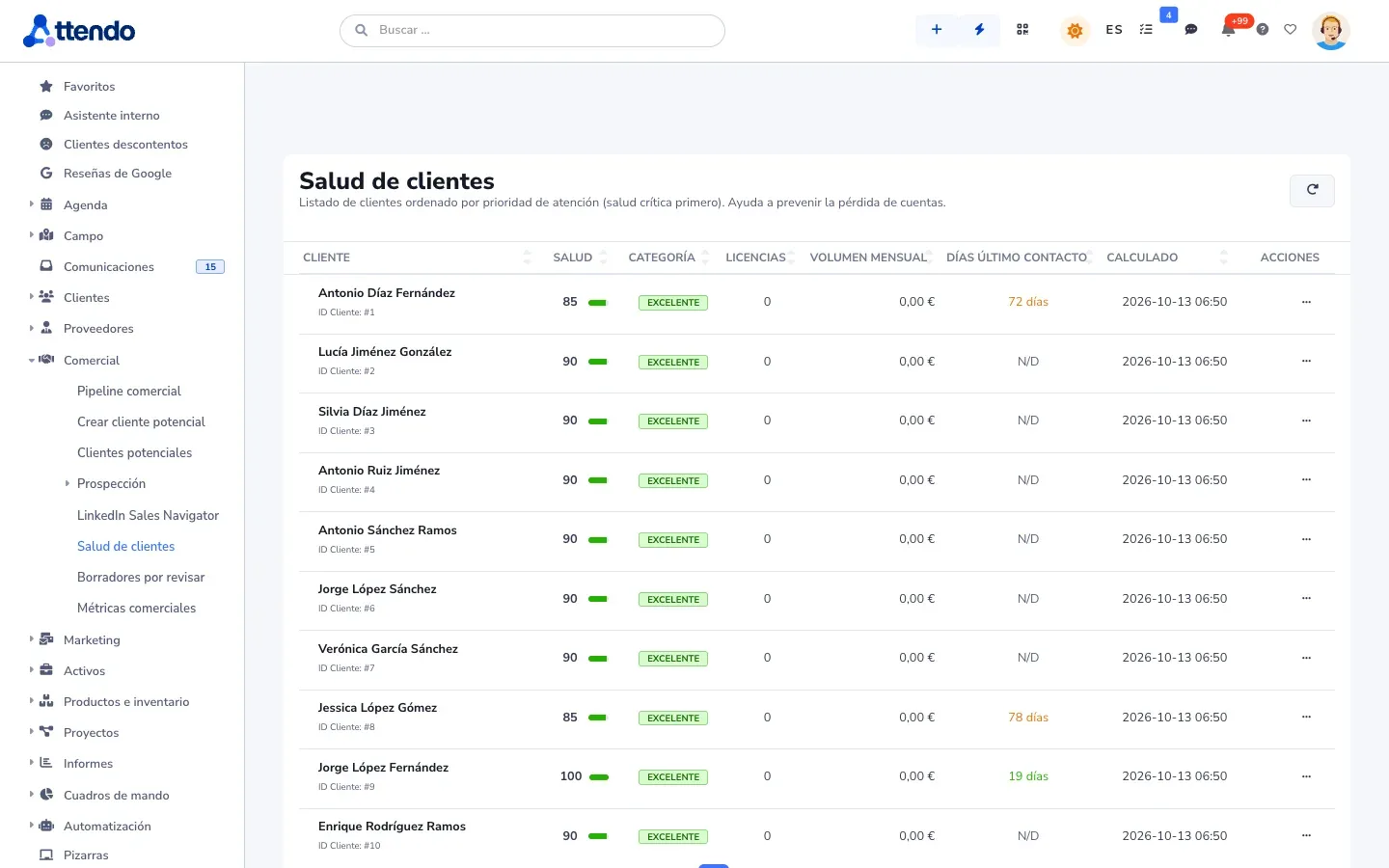
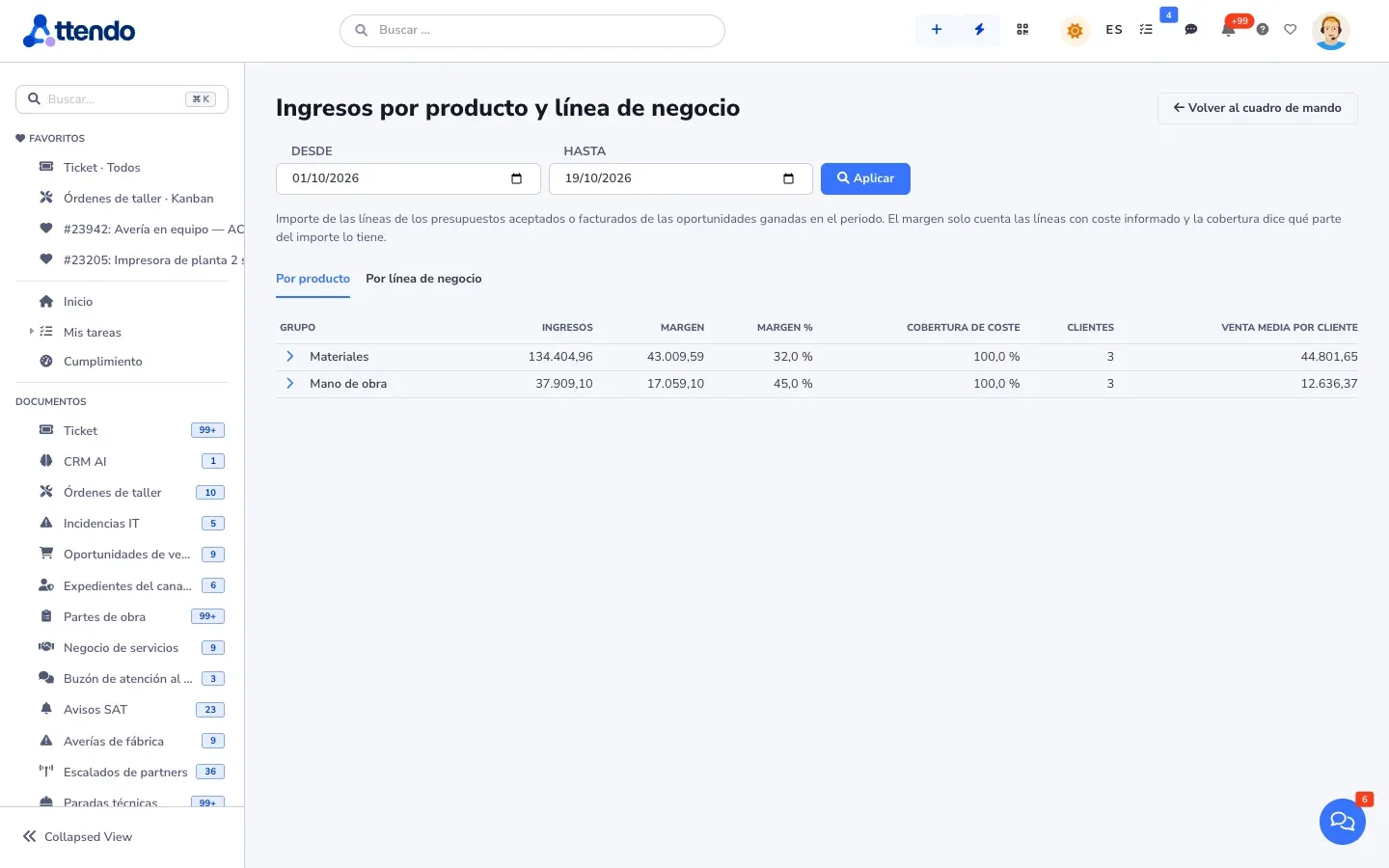
attendo puts what you invoiced through your ERP side by side with what it cost to serve: hours, materials, deliveries, issues and travel, per customer and per contract. And it warns you before a customer leaves: less activity, more issues or lower satisfaction.
- Profitability per customer and per contract, counting only the days in force
- Churn risk with its warning signs
- Satisfaction by business line
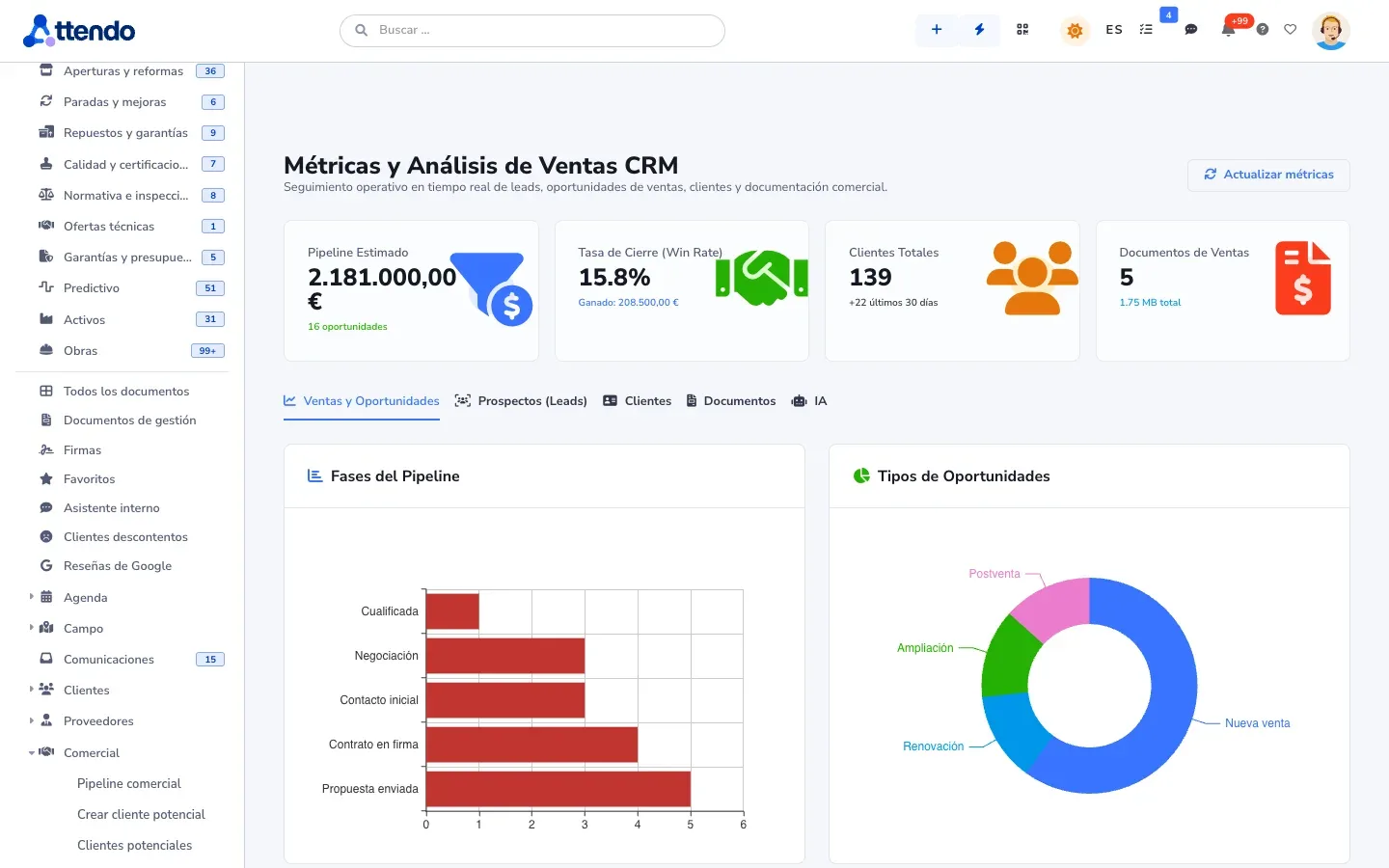
- Sales metrics on one screen, with the Sales AI tab, and an attendo CRM dashboard you can edit
- Sales dashboard: quotes, demos and visits, weighted forecast, margin with cost coverage and targets by period. Each sales rep sees their own row, and only administrators and the manager see the incentive
Who it is for
For any company that has customers
Whether you sell products, services or projects, to businesses or to consumers, in one country or in several: attendo CRM is configured with your stages, your documents and your vocabulary. These are the most common industries, not the only ones.
Industries
Types of business
- Companies that sell to other businesses
- Manufacturers and distributors with a sales network
- Companies that sell projects or professional services
- Companies with repeat or subscription customers
- Companies with recurring service contracts
Beyond CRM
What a standalone CRM does not include
| Need | How attendo covers it |
|---|---|
| Seeing what happens after the sale | Orders, deliveries, issues, projects and support on the same customer record |
| Contracts, maintenance agreements or subscriptions | Contract with scope, term, SLA and an hour bank if there is one, with a renewal alert |
| Quotes with options | Web quote: the customer chooses, adjusts and accepts |
| Collecting deposits | attendo Pay on your gateway, without the card going through attendo |
| Signing quotes and contracts | attendo eSign from the record, with advanced or qualified e-signature |
| Invoice numbering | Set by your connected ERP, which issues the invoice, and synced back on its own |
| Several companies or brands | Issuing companies with their own series, brand and email addresses |
| Knowing whether a customer is profitable | Invoiced through your ERP versus real cost, per customer and per contract |
marIA in the CRM
Before you call, you already know what hurts
-
Filters and scores leads
With Sales AI, it discards spam, classifies, scores from 0 to 100 and assigns to the right sales rep. These flows come turned off and are configured during onboarding.
-
Prepares the sales rep
A summary of the lead, their likely pain point, a SWOT and a proposal, in one panel. When the stage changes, marIA prepares the proposal.
-
Writes the draft
The reply waits for approval. A person sends it.
-
Watches customer health
It alerts the account owner when something gets worse.
-
Prepares prospecting
It gathers companies from several sources, removes duplicates and prepares a different email for each one. With LinkedIn Sales Navigator, it runs searches, invitations and messages from each sales rep’s account, through a third-party provider and with daily limits.
-
Handles your website
The chatbot qualifies the visitor and hands off to a person when it should.
What it does not do: close deals or write to your customers on its own. Automatic sending exists only for low-scoring leads, only if an administrator turns it on, and it is logged.
AI Autopilot (Multiple AI Agents) · sales example
A lead enters the AI Autopilot sales process. marIA researches the company, scores the opportunity and drafts the first email; the sales rep approves sending it.
-
01 Research marIA · Researches
Prospect LD-2026-0318 Distributor · 3 warehouses- Industry
- Size
- Interest
Facts ready
-
02 Qualification marIA · Scores
Qualified Opportunity score 78/100- Fit · High
- Urgency · Medium
Threshold passed
-
03 Conversation marIA · Drafts
Qualified First email to the lead Not sentDraft ready
-
04 Human review Person
Waiting for you Area sales rep Pending approvalAgents paused
Integrations
With your ERP or without it
With Odoo, attendo sends the quote, and tasks and activities sync both ways. With Business Central, Holded and SAP Business One, customers, items and sales documents flow across. Each connector is validated against your ERP’s test environment. And if you already use a marketing CRM, the two can coexist via API: one captures, the other serves.
Honest comparison
Where it fits (and where it does not)
We would rather you know now than at the third meeting.
| If you sell… | attendo CRM |
|---|---|
| With a relationship after the sale: repeat orders, contracts, support or projects | attendo CRMThis is its home turf: it connects the sale with everything that comes after |
| Products, services or projects, in any industry | attendo CRMIt fits: catalog, quotes with options, e-signature and payment |
| As a manufacturer or distributor with a partner network | attendo CRMIt fits: master customer, partner portal and catalog |
| Only through high-volume marketing lead capture, with no relationship with the customer afterwards | attendo CRMA marketing automation tool will suit you better. If a relationship follows, the two can coexist |
Detailed comparisons: attendo vs. HubSpot, vs. Salesforce. See all.
The rest of the platform
The rest of the platform, when you need it
Modules used by attendo CRM
- marIA (Smart-AI)
- Flows and AI-Flows
- AI Autopilot (Multiple AI Agents)
- AI-Chat and DB Assistant
- Sales AI
- Timeline
- Tags and document management
- Business documents
- attendo eSign
- attendo Forms
- attendo Tasks
- Compliance · My team
- Kanban
- Gantt chart
- Scheduling and calendar
- Communications
- Satisfaction surveys
- Web quotes
- attendo Pay
- ERP integration
- Reports and dashboards
- Contracts and SLA
- Customer, supplier and partner portals
- Web chatbot
- Projects and construction
- Print designer
- Marketing and prospecting
- API v4, webhooks and MCP
Frequently asked questions
Frequently asked questions
Will it work for my industry?
Yes. attendo CRM is configured for any industry, size and country: your sales stages, your document types, your fields and your vocabulary. The industries you see on this site are the most common ones, not the only ones.
Why not a standalone CRM?
Because it cannot see what happens after the deal is signed: deliveries, orders, issues, projects, hours and payments. attendo can, because it is the same system. If you already use a CRM for marketing, the two can coexist.
My sales reps do not enter data. What is different?
Adding a record takes seconds, the next action is mandatory and marIA writes the drafts. Logging takes less effort than not logging.
Does it replace my invoicing?
No. attendo is not an ERP or accounting software: the invoice is issued by your connected ERP, which receives quotes, orders and delivery notes without anyone retyping them. The connector is validated against your test environment.
Is the e-signature on a quote legally valid?
Yes. attendo eSign signs at the advanced or qualified level, with timestamping and evidence. We confirm in writing which signature level covers each case.
Does the AI write to my customers on its own?
Not by default. Drafts wait for approval. Automatic sending exists only for low-scoring leads, if an administrator turns it on, and it is logged.
Can I collect the deposit online?
Yes, with attendo Pay on your own payment gateway. The card never goes through attendo.
Does it alert me to expiring contracts?
Yes. The contract list shows what expires in 30, 60 or 90 days, and each contract item decides who is alerted beforehand. Renewing creates the next period’s contract with the same item, price, supplier and tags.
Can I bring my customer base?
Yes. Customers, contacts, contracts with their supplier, tags, rates and products from Excel or CSV. The file is checked in full before anything is saved and tells you what fails in each row.
Request a demo
Find out which customers make you money
We show you attendo CRM with your customer base, your contracts and your way of selling. If it is not a fit, we will tell you.
- With your operation, not a generic demo
- A real person from our team replies
- No cold calls afterwards
Would you rather talk first?
- Phone +34 910 053 530
- Email sales@attendo.me
- Monday to Thursday 9:30 AM to 6:30 PM and Friday 9:30 AM to 2:30 PM (Spain time)