
IT services and MSPs
Remote and on-site support, with the SLA in plain view
For MSPs, systems integrators, network installers and software companies that support their customers. Every contract with its SLA and prepaid hours, and a ticket that ends in a site visit stays in the same record.
- Prepaid hours deducted as time is logged
- Email, WhatsApp, Teams and phone in one queue
- Client devices and licenses with their history
Who it is for
Is it right for your company?
For companies that provide IT support to other businesses, remotely or on site:
Not on the list? attendo can be set up for any line of business, with your document types, your fields and your vocabulary.
The challenges
Every client’s SLA lives in a spreadsheet
An IT services company sells hours and response times. If it does not measure them, it gives them away.
- Hours not deducted
Prepaid hours that never add up
Each client has a contract, an SLA and a block of hours. They are tracked in a spreadsheet someone updates at month-end, when it is too late to fix.
- Not logged
What gets answered on a phone gets lost
Requests come in by email, phone, WhatsApp and Teams. Whatever is solved in a call or a chat leaves no trace and no billable time.
- No inventory
The client’s inventory lives in one tech’s head
Devices, licenses and warranties for each client are found by asking around. If that person is on vacation, you start from scratch.
How attendo solves it
Each challenge, with the modules that solve it
They are modules of the same platform: you turn on the ones you use, and they all work on the same record.
Every contract with its SLA and prepaid hours
The SLA runs on your business calendar and warns you before a breach. Hours come off the block as they are logged. Reports and dashboards show each client’s usage.
Laptops for the Engineering team
- 09:12 · EmailEmma’s request comes in
- 09:12 · marIASuggests category: IT purchasing
- 11:40 · ApprovalApproved by management
- 12:05 · OrderSent and signed by the supplier
Every channel in one record
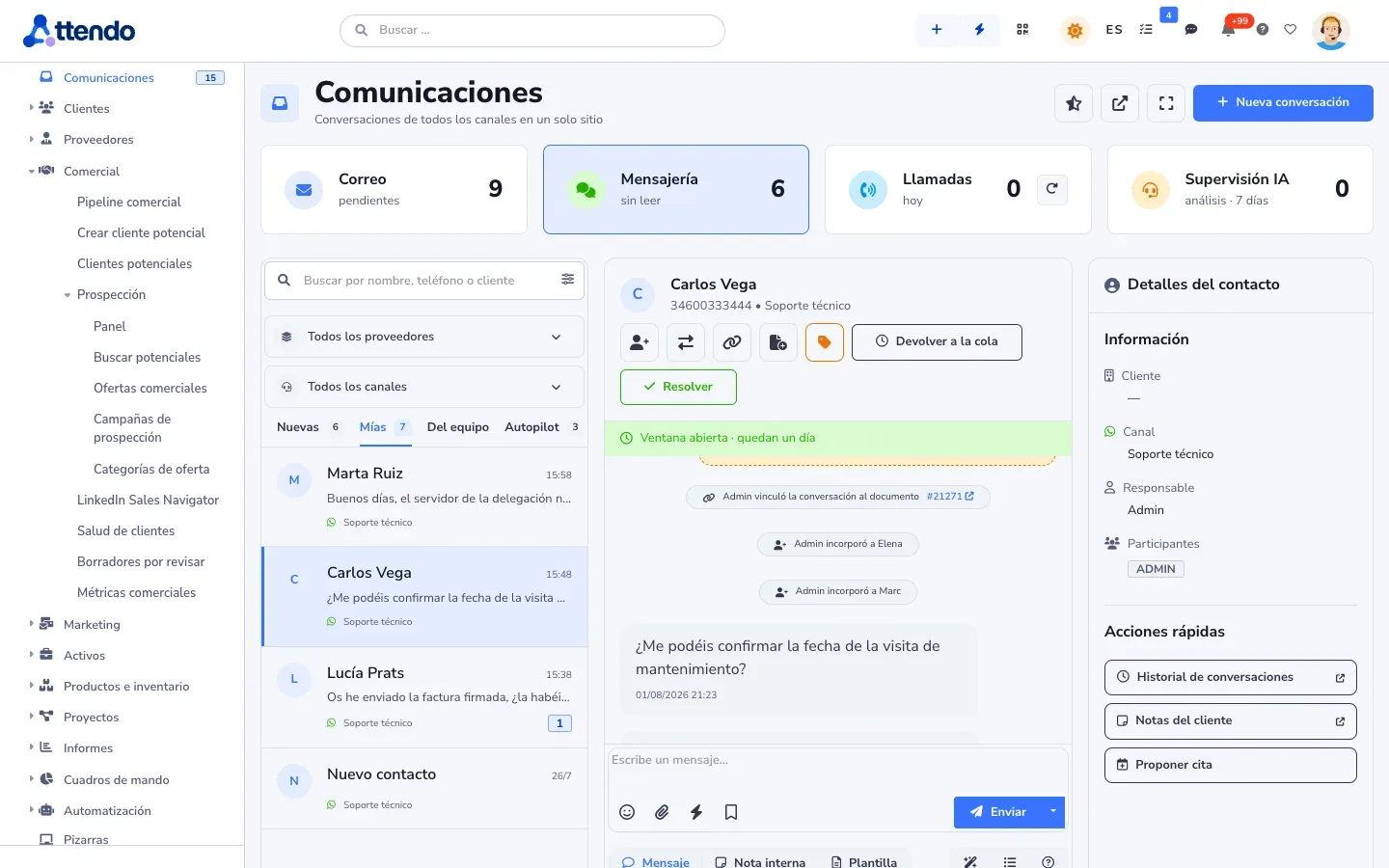
Email, WhatsApp, phone with call recording and a website chatbot all open or update the same ticket. Teams and Slack come into the same inbox as text conversations. Calls are linked to the ticket, and chats are too.
- Teams
- Slack
- Meet
- Web chat
- Phone
One single record
WhatsApp “What time are you coming?”Teams Message from the supervisorCall Transcribed and summarizedThe client’s inventory, with its history
Client devices and licenses are assets with a QR code, serial number, warranty and history. If someone has to go on site, the work order comes from the same ticket and the technician closes it in the app. If you use an RMM, its alerts can open the ticket through the API.
Laptops for the Engineering team
- 09:12 · EmailEmma’s request comes in
- 09:12 · marIASuggests category: IT purchasing
- 11:40 · ApprovalApproved by management
- 12:05 · OrderSent and signed by the supplier
A typical day · example
A server that will not boot, first thing on a Monday
From a Teams message to a closed site visit, with every minute deducted from the prepaid block. Example scenario, with made-up data.
File server will not boot
- Client
- Accounting firm · 25 seats
- Contract
- Managed support · 40-hour block
- SLA
- 1-hour response
- Asset
- Server · under warranty
- 08:02Message received on Teams, ticket opened
- 08:03marIA summarizes the issue and suggests critical priority
- 08:4045 minutes logged against the block
- 09:10Work order created for the site visit
- Step 1
It comes in on Teams
The office manager writes to the support bot in Teams. The agent opens the ticket from the conversation, with the client, its contract and a critical-priority SLA.
- Step 2
Remote attempt first
The technician connects remotely with the usual remote tool and logs the time on the ticket. The client follows the status in the portal.
- Step 3
Someone has to go
It is the power supply. A work order is created from the ticket, with the device and its warranty in view.
- Step 4
Closed with time and signature
The technician swaps the part, the client signs in the app and the hours come off the contract’s block.
Solutions for this industry
Where to start
They are the same platform with each area’s modules turned on. Start with one and add the rest without migrating anything.
marIA, the attendo AI
marIA at an IT services company
It classifies and summarizes so technicians start with what matters. A person reviews anything that goes out.
-
Classifies and prioritizes
It reads the ticket, proposes a category and priority based on the client’s contract and routes it to the right queue.
-
Drafts the reply
It writes the answer with the client’s history and your knowledge base. You review it and send it.
-
Connects your tools
With the MCP server and API v4, your agents and systems read and write in attendo with the permissions of each key.
What it does not do: It does not connect to client devices or run actions on them.
Honesty
What attendo does not do
Better to know before the demo. And if your case calls for another tool, we will tell you.
- No device monitoring (RMM)
attendo does not watch servers or push patches. If you use an RMM, attendo works alongside it and can receive its alerts through the API.
- For a remote-only MSP, a PSA
If your whole service is remote and built around the RMM, a PSA from that ecosystem may be a better fit.
- High-volume consumer support
If you handle thousands of consumer tickets a day with self-service, Zendesk and similar tools are ahead. We cover it in the comparison.
Compare and calculate
Before you decide
An honest comparison and a calculator with its assumptions in plain view.
attendo vs. Zendesk
A leading help desk. attendo keeps going when the ticket ends in a site visit, a spare part and a delivery note.
Read the comparison TicketingCost of missing the SLA
What late tickets add up to per month and per year: contract penalties and the hours spent explaining and compensating.
You need: Tickets a month, percentage breached, penalty and handling hours
Open the calculatorBy department
Related use cases
Other industries
Frequently asked questions
Frequently asked questions
Does it work for an MSP?
Yes, if you provide remote and on-site support with contracts and prepaid hours. If your whole service revolves around an RMM, a PSA may fit better, and we will tell you so in the demo.
How are prepaid hours deducted?
When time is logged on the ticket or the work order. The balance shows on the contract, in reports and, if you want, in the client portal.
Can I support clients over Teams and Slack?
Yes. Messages to the Teams bot or in a Slack channel come in as text conversations in the same inbox as email, WhatsApp and phone. You reply from attendo, and each conversation is linked to its ticket.
Does it keep an inventory of devices and licenses?
Yes, as client assets with a QR code, serial number, warranty and a history of tickets and visits.
Does it connect with my tools?
With API v4, inbound and outbound webhooks and an MCP server. Your systems and your AI agents can read and write in attendo.
Can clients see their hours?
If you choose to show it, yes: in their portal they see their tickets, their status and their prepaid balance.
Request a demo
Tell us how you support clients today
We will show you attendo with your contracts, your channels and your prepaid hours. And if it does not fit the way you work, we will tell you. Would you rather try it yourself? Request a trial account and we will set it up with your case.
- With your operation, not a generic demo
- A real person from our team replies
- No cold calls afterwards
Would you rather talk first?
- Phone +34 910 053 530
- Email sales@attendo.me
- Monday to Thursday 9:30 AM to 6:30 PM and Friday 9:30 AM to 2:30 PM (Spain time)