
attendo Ticketing
Every ticket in one queue. Whatever channel it comes from.
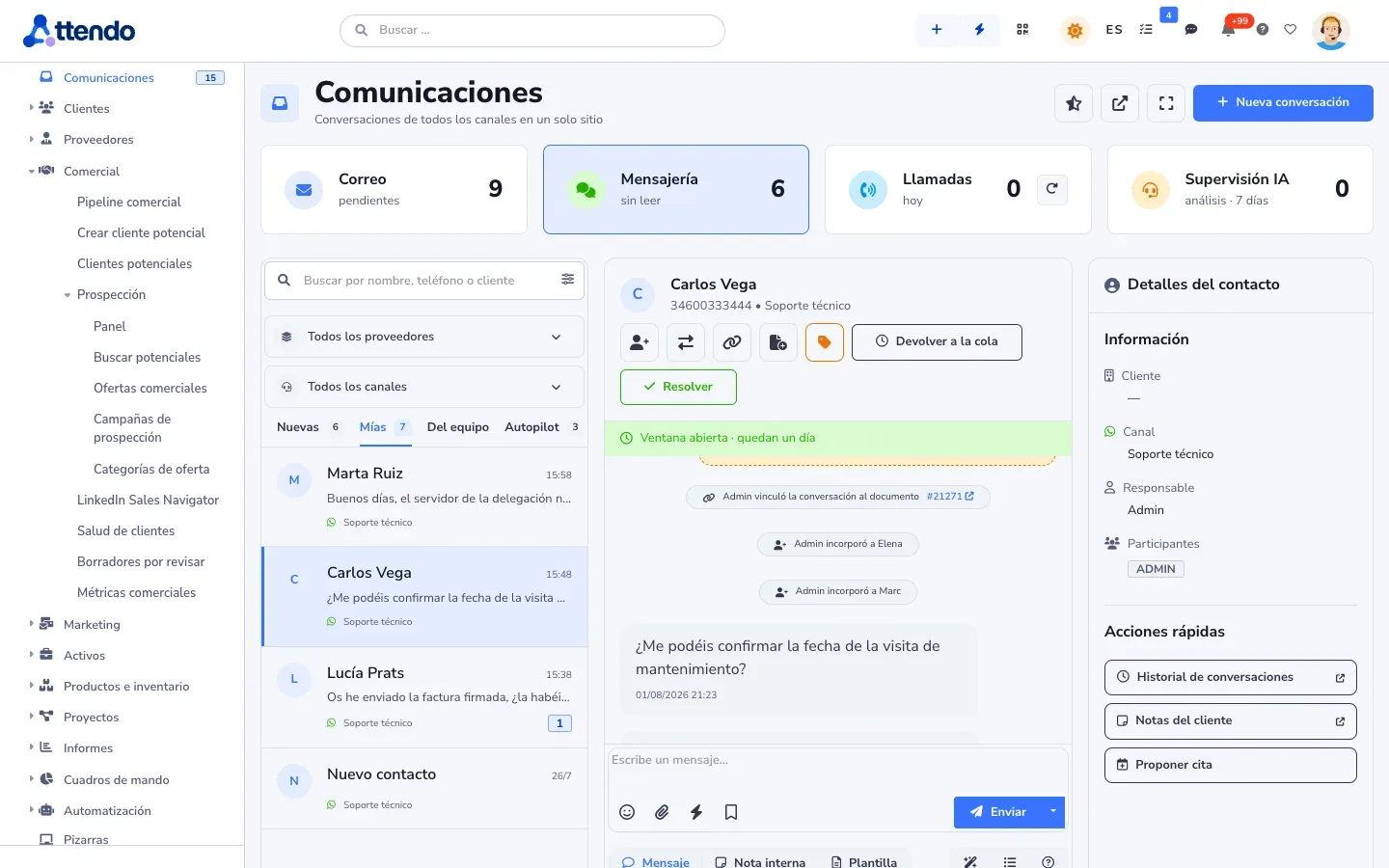
Email, WhatsApp, Teams, Slack, phone, chat, portal and QR forms all land in the same place, with the SLA counted to the minute on your business calendar. And when a ticket means going on site, attendo keeps going.
- Shared mailboxes that really work
- SLAs with holidays and business hours
- Customer portal with your branding
If this sounds familiar, keep reading
Your channels do not talk to each other
The customer sends an email, then a WhatsApp to the technician’s phone, then calls. Three people give three different answers. And on Friday someone works out the SLA in a spreadsheet nobody believes.
- No reply
The shared inbox swallows things
Emails that were read and never answered, and replies that go out from someone else’s account.
- Not measured
The SLA is a Friday spreadsheet
It is measured late, by hand, and you cannot show it to the customer.
- Unassigned
Two people answer the same thing
Or nobody does, because each one thought the other would.
- Undocumented
Knowledge goes on vacation
What one person knows is nowhere to be found when they are out.
attendo Ticketing is the help desk: issues and requests in a queue, with SLAs to the minute. Looking for customer care across every channel, with customer history, surveys and retention? That is attendo Customer Service.
How it works
From the first message to the survey, without a break
Six steps, and it is the same ticket from start to finish.
- Step 1
The ticket comes in
Through whichever channel the customer chooses. If there was already a conversation, it joins it.
- Step 2
It is classified and assigned
By rules, by group or with help from AI, if you turn it on.
- Step 3
The SLA clock starts
The deadline comes from the contract, the ticket type or the default, and the record shows which one applies.
- Step 4
The agent replies
With templates, suggested FAQ answers and a draft marIA has already prepared.
- Step 5
If someone has to go on site, it carries on
The same ticket generates the work order, the service report and the delivery note. Nobody copies anything into another program.
- Step 6
It is closed and measured
The customer rates it, and a low score opens a recovery case that same morning.
The customer history is there for the next ticket
01 In through any channel Email, WhatsApp, phone or portal: every message becomes a ticket with its customer.
02 marIA classifies It suggests type, priority and queue. The agent applies or corrects it.
03 Queue and deadline The SLA counts business hours, and anything running late is flagged in plain sight.
04 Reply with a draft marIA drafts it with the customer history; the agent sends it.
05 Close and survey On close, the survey goes out and response times are measured.
Every change is documented for the next one
01 Requested From a form: each submission creates a change that is already classified.
02 Assessed in phases The phases show on the record, and closing stays locked until they are done.
03 Approved by link The approver signs off from their phone with a code, no user account needed.
04 Window on the calendar The change takes its slot and the whole team can see it.
05 Review and close The result is checked and it closes with the signed checklist.
Channels
One conversation, even if it starts in three places
Every email creates a ticket or joins the one it belongs to, attachments included. Shared mailboxes really work: support@ replies as support@, not as whoever connected it. And you know whether each reply was delivered, bounced or failed.
- Email via IMAP, Microsoft 365 (multiple organizations too) and Google Workspace
- WhatsApp with Meta’s official API and multiple numbers
- Unified inbox with exclusive claiming: nobody replies twice
- Phone: a call is an entry on the ticket, with recording and summary, and voice bots that answer on your phone system
- Web chat with handoff to a person, plus Microsoft Teams and Slack messages
- Forms and QR codes with no username or password
- API so your systems can open tickets
SLA
Meet the agreement. And prove it.
The SLA is counted to the minute on the hours and holidays of your business calendar. And it pauses when the ball is in the customer’s court. attendo warns you before a breach, flags overdue items on every screen and, with the escalation flow turned on, escalates the critical ticket nobody picks up.
- Deadlines by contract, by ticket type or by default, with their source in view
- Whatever comes in on a holiday follows the after-hours workflow
- Hour banks that draw down as time is logged, with the balance in the portal
- An SLA report, also by inbound channel, that you can show the customer
Laptops for the Engineering team
- 09:12 · EmailEmma’s request comes in
- 09:12 · marIASuggests category: IT purchasing
- 11:40 · ApprovalApproved by management
- 12:05 · OrderSent and signed by the supplier
Queues
Each agent, their own queue. You, the full picture.
One screen for every ticket, with views that keep their own count: all, overdue, no agent and the ones you save. Table, board or calendar, and the record in full screen without leaving the list.
Searches filter across all tickets, not just the ones that fit on the screen. And global search also finds customers, contacts, projects, tags and assets, always limited to what each person can see.
- Assignment to a person or a group, with first and second tier
- Each profile sees only its own, also by area, brand or customer
- Tasks from templates, and a calendar with “Me” and “My groups”
- Merge duplicates without losing history, and linked reopening
- Auto-close that the customer can cancel. A ticket with missing data stays open, with a private note
- No half-closed tickets: each type requires the fields you decide, on the record, in the app, in the portal or via the API
- Default values per ticket type, and which agent groups see each one
- From the record, Run flow runs a manual flow and Hand off to a technician assigns it to someone with the app and keeps it reserved for them
- Task compliance: each person opens a list of what is at risk of being missed (SLAs, customers waiting, unanswered conversations, signatures about to expire), snoozes or mutes items with a reason, and supervisors reassign from it
- Teams
- Slack
- Meet
- Web chat
- Phone
One single record
WhatsApp “What time are you coming?”Teams Message from the supervisorCall Transcribed and summarizedSelf-service
Fewer “how is my ticket going?” calls
In the portal, your customers open tickets, follow their status, download service reports and see their hour balance. Appointments, surveys, contracts or invoices are sections you turn on if you want them.
When an appointment is confirmed, the email to the customer, the task in the calendar and, if it is online, its Teams or Meet meeting go out. The customer reschedules or cancels it from their link.
- Each person at the customer with their own account and two-step verification, a role and a scope: their own, their site’s or the whole group’s
- Your brand, your menu and your words, and you decide field by field what they see and fill in
- Appointments: the agent proposes one from the ticket or the conversation, with the slots when the host, the guests and the room are free
- Public and private FAQs, suggested while the agent types
- Reply templates with the customer’s and the contract’s data
Your tickets and service reports
- TK-2026-1954
- In progress · technician assigned
- TK-2026-1949
- Waiting for parts
- SR-2026-0873
- Signed service report · PDF
- Hour bank
- 24 of 40 h available
- Today 8:40 AMYou open the ticket from the portal
- Today 9:15 AMAssigned to the technician for your area
- Today 1:20 PMService report signed, ready to download
Processes
No change reaches production without approval
Phased processes with Business Process Flow (BPF) bring order where it is needed: a change request, an employee onboarding or a complaint. Closing is blocked until the requirements are met, and approvers approve from a link, with no login.
Update the card reader firmware
- Phase
- Manager approval
- To close
- Signed test checklist
- Approval
- By link, with a code
- Deadline
- Friday 12:00 PM
- Mon 9:10 AMRequest logged with its impact
- Tue 10:05 AMApproval link sent
- PendingClosing blocked until the checklist is signed
Quality
A bad score becomes assigned work
The survey goes out by email, SMS or WhatsApp, without pestering the same customer. A low score opens a recovery case for the agent, and the unhappy-customers panel does not let it be forgotten.
- Satisfaction by business line
- Reports on SLA, reopens, queue age, workload and billable hours
- A support dashboard you adapt yourself, and a daily email report
Who it is for
The most common industries. And any other.
attendo Ticketing adapts to any industry and any company, in any country, with its own document types, fields and vocabulary, and no custom development. These are the most common ones, not the only ones.
Industries
Types of business
- IT service and support providers
- Companies that maintain their customers’ assets
- Organizations that maintain their own assets
- Companies with repeat or subscription customers
- Public administrations and agencies
Requirements by industry
Different support for every industry
| Industry | How attendo covers it |
|---|---|
| IT services and managed support | SLA per contract, hour banks, customer inventory with QR codes, first and second tier, and a report per customer |
| Internal IT support | Major incidents, changes with approval, employee onboarding with task templates, and equipment inventory |
| Customer service | The channel as data, complaints with escalation and due date, returns and satisfaction. For end-to-end customer care, with voice bots and retention, attendo Customer Service |
| Public administration | Citizen portal and whistleblowing channel |
| Whistleblowing channel | Anonymous reports, acknowledgment of receipt within its deadline, and handling by administrators only |
| Manufacturers and repair services | Warranty service requests and quotes, with each brand and its SLA. See attendo After-Sales |
marIA in support
You open the ticket and the draft is already there
-
Writes the reply
With the customer’s history in front of it. A person sends it.
-
Classifies and filters
Ticket type, tone and spam, before it reaches the queue.
-
Suggests the FAQ answer
The one that fits, while the agent types.
-
Answers from your FAQs or your manuals
Only if you turn it on. It comes turned off.
-
Handles web chat
And hands off to a person when it should.
-
Summarizes the long call
In four lines, inside the ticket.
-
Sorts what is in the red
In the Compliance list, also by the customer’s frustration or the value at stake, with a monthly cap and without judging people.
What it does not do: reply to your customers on its own by default: it proposes and a person sends. Automatic replies based on your documentation come turned off, and you are the one who turns them on.
Integrations
Connected to what you already use
Honest comparison
Where it fits (and where it does not)
We would rather you know now than at the third meeting.
| If your support… | attendo Ticketing |
|---|---|
| Often ends in a visit, a part or an invoice | attendo TicketingThis is its home turf: the ticket follows through to the delivery note that goes to your ERP |
| Works with contracts, SLAs and hour banks | attendo TicketingThis is its home turf |
| Is 100% digital, very high volume and lives on an app marketplace | attendo TicketingA pure help desk will suit you better |
| Belongs to an IT team that already works inside its development tool | attendo TicketingStay where you are |
Detailed comparisons: attendo vs. Zendesk, vs. Freshdesk. See all.
Calculate with your own numbers how much missing the SLA costs you.
The rest of the platform
The rest of the platform, when you need it
Modules used by attendo Ticketing
- marIA (Smart-AI)
- Flows and AI-Flows
- AI Autopilot (Multiple AI Agents)
- AI-Chat and DB Assistant
- Timeline
- Tags and document management
- attendo Checklist
- attendo Forms
- attendo Tasks
- Compliance · My team
- Kanban
- Scheduling and calendar
- Communications
- Satisfaction surveys
- Reports and dashboards
- Assets and inventory
- Contracts and SLA
- Customer, supplier and partner portals
- Web chatbot
- Telephony
- Whistleblowing channel
- Time tracking
- Appointments and online booking
- Print designer
- API v4, webhooks and MCP
Frequently asked questions
Frequently asked questions
Is it hard to connect our email?
No. With IMAP or Microsoft 365 it takes one short session. Instant delivery and Google Workspace are set up with your organization’s permissions.
WhatsApp with the official API?
Yes, with your Meta account. Message templates are approved by Meta before you use them.
How do my customers get into the portal?
Each person with their own account: you grant access from the contact record and they get an invitation to create their password. They can also sign in with Microsoft or Google, with two-step verification. They do not need to install anything.
What does my customer see in the portal?
Whatever you decide. Each person has a role and a scope: their own items, their site’s or their whole group’s. The portal carries your brand and your words, and you decide field by field what is shown and what is filled in. Appointments, surveys, contracts or invoices are sections you turn on if you want them. If you serve several business lines, each one can have its own portal, with its own address or domain. And on the home page, an SLA block shows how many tickets are on time, at risk or overdue. See the portals.
We work for insurers or property managers. Can they follow their customers’ cases?
Yes, as partners. Each one works its portfolio from its own portal, under the terms set for each customer: what it sees, what it does on their behalf and who the emails go to. And, if you agree, with its own brand.
Does each agent see only their own work?
Yes. By profile, by group and by field value: area, brand or customer. An external collaborator can see only their own queue.
Is it legal to record calls?
Yes, with prior notice and a record of who gave consent. If you use call coaching, staff must be told beforehand.
Can I handle tickets that come in through Microsoft Teams or Slack?
Yes. What people write to the Teams bot or in a Slack channel lands in the Messaging inbox, linked to the ticket, and you reply from attendo, text only.
Does the AI reply to my customers on its own?
Not by default. It proposes and a person sends. Automatic replies based on your documentation come turned off, and you are the one who turns them on.
Request a demo
Bring your inbox. We will show you how it looks in attendo.
We show you attendo with your ticket types, your channels and your deadlines. If it is not a fit, we will tell you.
- With your operation, not a generic demo
- A real person from our team replies
- No cold calls afterwards
Would you rather talk first?
- Phone +34 910 053 530
- Email sales@attendo.me
- Monday to Thursday 9:30 AM to 6:30 PM and Friday 9:30 AM to 2:30 PM (Spain time)