Cookies. We use technical cookies to make this website work and, if you accept, analytics and advertising cookies to measure our campaigns. Cookie policy
Cookie settings
Choose which cookies you accept. You can change this at any time from “Cookie settings” in the footer of every page. Cookie policy
TechnicalAlways on
They make the website work, remember this choice, keep your conversation with the assistant if you use it, and protect the forms from bots. They cannot be turned off.
Google Analytics 4 measures statistically how the website is used. During your visit we also remember the campaign source you arrived with and the page you landed on, so we know which campaigns and pages bring us requests. Cloudflare Web Analytics counts visits without cookies and does not depend on this option.
Google Ads measures which requests reach us from our ads (conversions), without your name, email or phone number. It is not loaded until you accept this category.
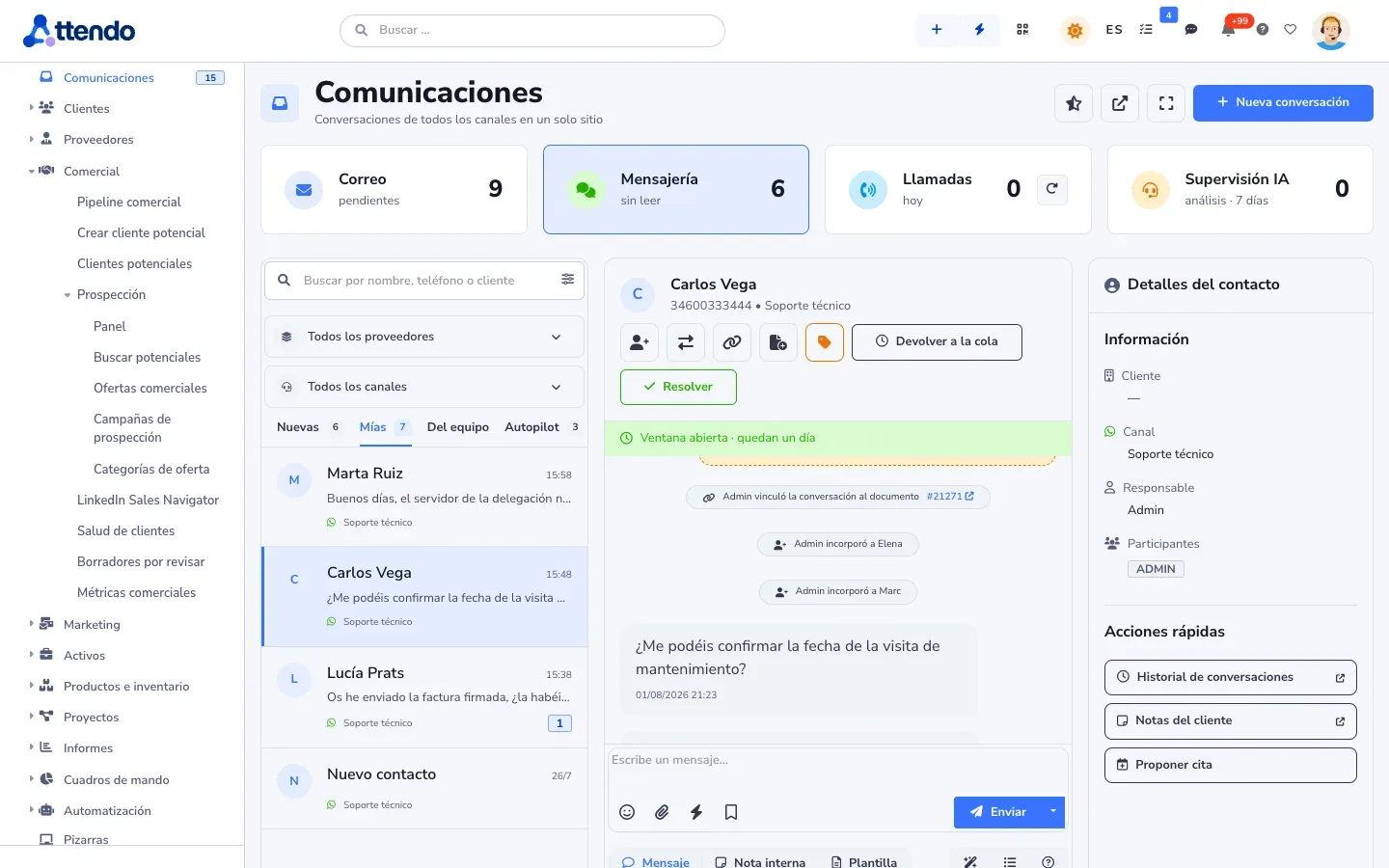
Asynchronous: email with Microsoft 365 or Google Workspace, portal and forms. Real-time: WhatsApp, Teams, Slack, Meet, web chat and phone. Each channel, with what it does and what it needs.
Asynchronous and real-time communications: what it does
Microsoft 365 and Google Workspace
Personal, shared and delegated mailboxes: support@ replies as support@. You know whether each email was delivered or bounced, and you sign in with your company account. It is enabled with your organization’s permissions.
WhatsApp Business
With Meta’s official API and your account: several numbers, each with its own team, and approved templates. Whoever accepts a conversation owns it, and the customer gets the signed service report on their phone. WhatsApp voice calls are available too.
Teams and Slack
What people write to the attendo bot in Microsoft Teams, or in the Slack channels where it is present, lands in the unified inbox. It is linked to the document’s record and you reply from attendo. Text only.
Teams and Meet meetings and appointments
Microsoft Teams and Google Meet meetings are linked to the document and the customer, with their recording and transcript. And the appointments you propose are created in Outlook or Google Calendar, with their meeting.
Web chatbot
One per brand, on your website or your portal, with a code snippet or the WordPress plugin. It answers from your documentation, collects the visitor’s details and hands off to a person when needed.
Calls through your phone system
Call from the record and each call becomes an entry on the document. Calls are recorded with a legal notice and logged consent, with a transcript and summary. Extensions per desk, IVR menus and voice bots that answer the call.
How it works
Step by step
This is how it is used day to day, on the same document as the rest of the modules.
Step 1
Choose your channels
Asynchronous for what can wait: email, portal and QR forms. Real-time for what cannot: WhatsApp, Teams, Slack, web chat, phone and meetings.
Step 2
Connect your accounts
With your organization’s credentials: the Microsoft or Google app registration, the Meta account and the phone system. We tell you in writing what is needed.
Step 3
Assign each inbound channel to its team
Each mailbox and each WhatsApp number, to its group. In the inbox, whoever accepts a conversation owns it.
Step 4
Everything ends up on the record
The email, the message and the call stay on the document’s timeline, in order. The big picture is on the communications page.
marIA in Communications
marIA classifies incoming email and suggests the reply in the inbox. On the record it writes the draft, and a person sends it. It transcribes and summarizes calls, and the web chatbot answers from your documentation before handing off to a person. Every operation is logged with who started it, the model and its cost. Spending has the monthly cap you set.
A unified inbox is the screen where a team receives and answers conversations from all its channels, such as WhatsApp, website chat or Teams, without switching programs.
An SLA (service level agreement) is the written commitment, usually part of a contract, on how quickly you will respond to and resolve a customer’s tickets.
What is the difference between an asynchronous and a real-time channel?
An asynchronous channel can wait: an email, a portal submission or a form is answered within its deadline. A real-time channel needs an answer on the spot: a WhatsApp message, a chat or a call.
Can I serve customers from Teams or Slack?
Yes. What people write to the attendo bot in Teams, or in the Slack channels where it is present, reaches the unified inbox. You answer it from attendo, as text.
Are Teams or Meet meetings recorded and transcribed?
Yes. The meeting is linked to the document and the customer, with its recording and transcript.
Which phone system do I need?
The Lyria phone system. If you have a different one, we assess it before implementation.
Do you use the official WhatsApp API?
Yes, with your Meta account, and we set it up with you. Meta approves templates before they are used. For small volumes there is a lighter, unofficial channel that only sends text.
Request a demo
Try it with your processes
We will show it to you with your own document types and the way you work. If it is not a fit, we will tell you.