
Project management software
Project management software with your margin up to date
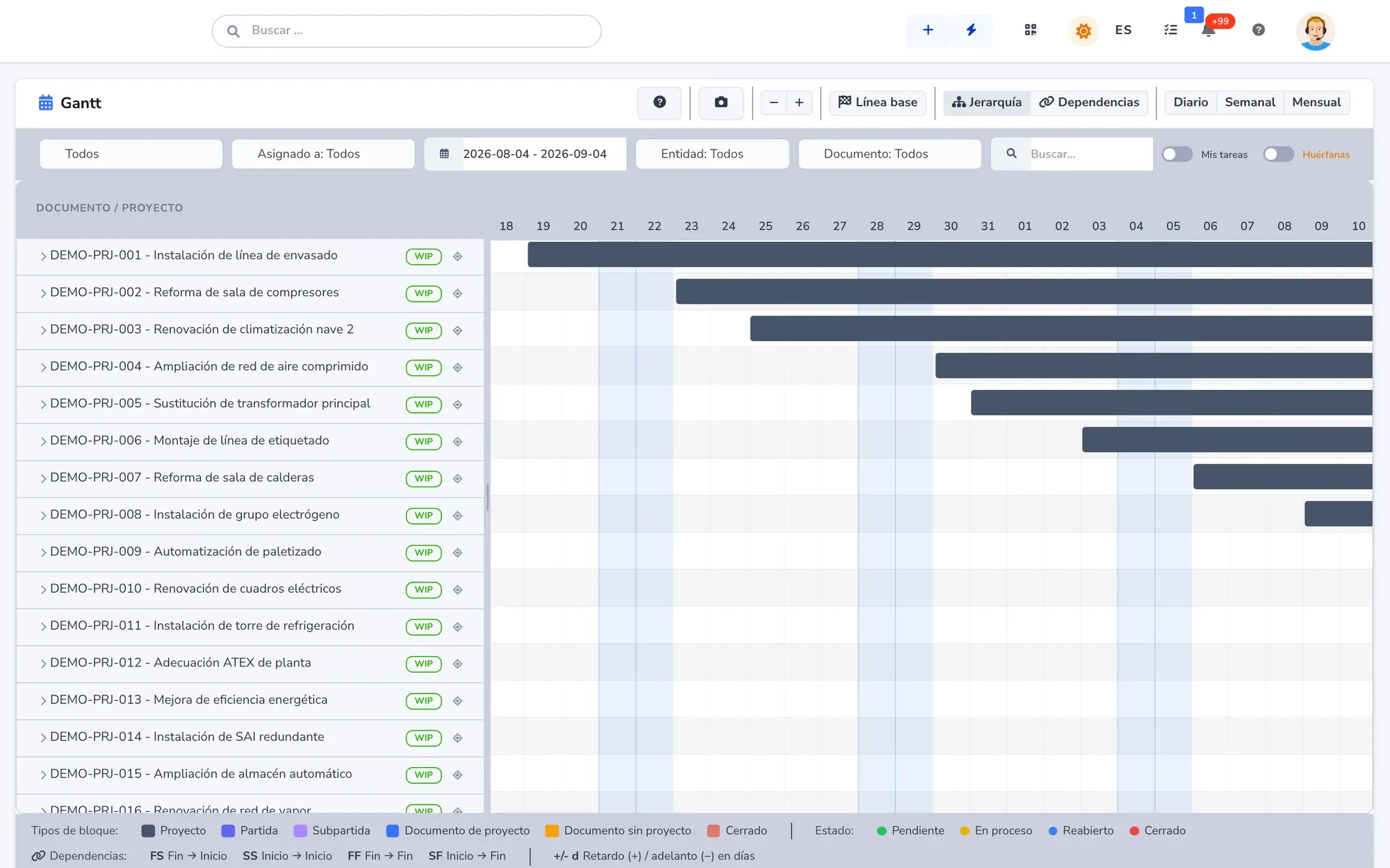
Plan on a Gantt chart with a baseline, see who is free before you promise a date and add up hours, expenses and materials as the work happens. With documents, signatures and the customer on the same project.
- Gantt chart with baseline and dependencies
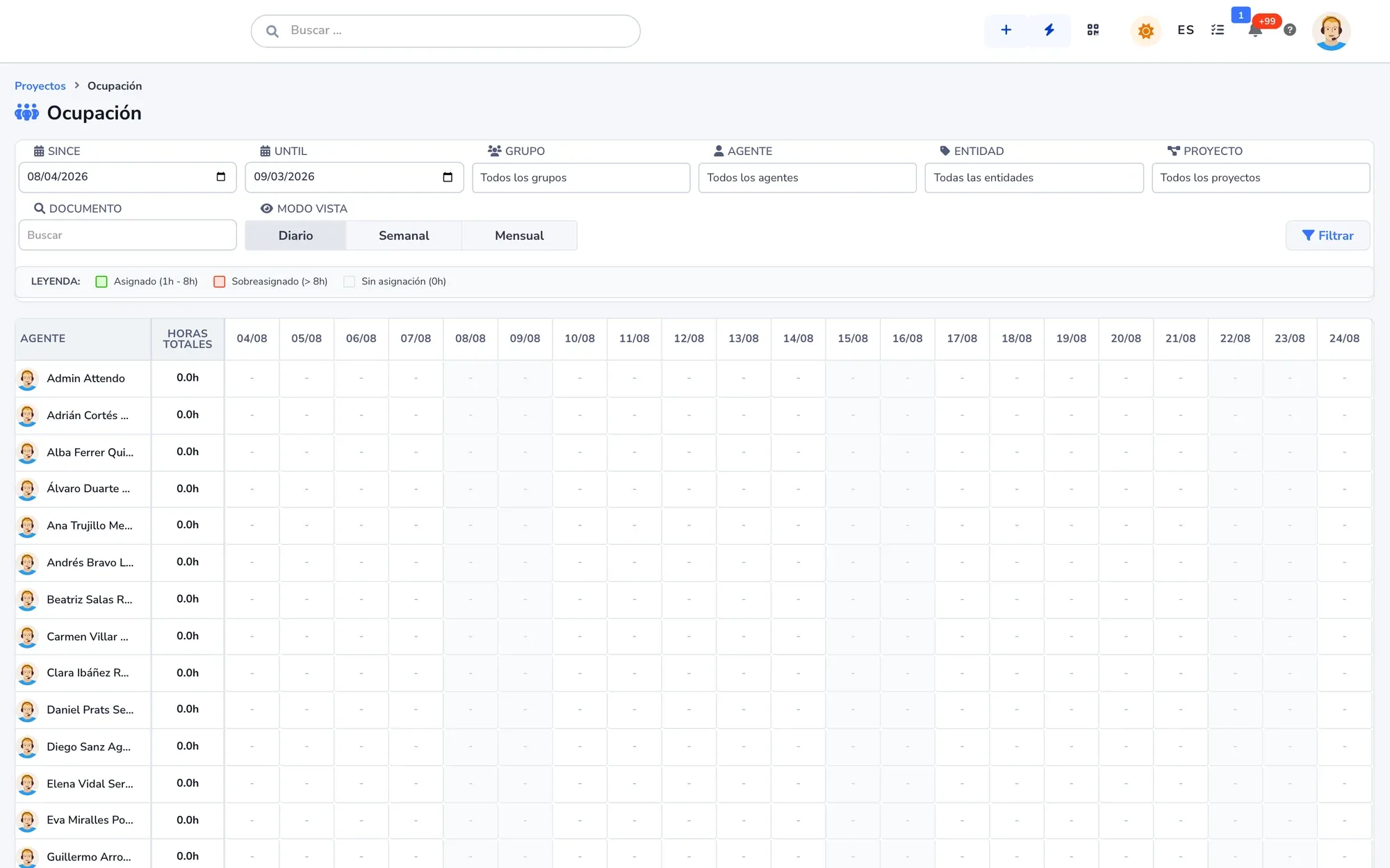
- Everyone’s workload, before you promise
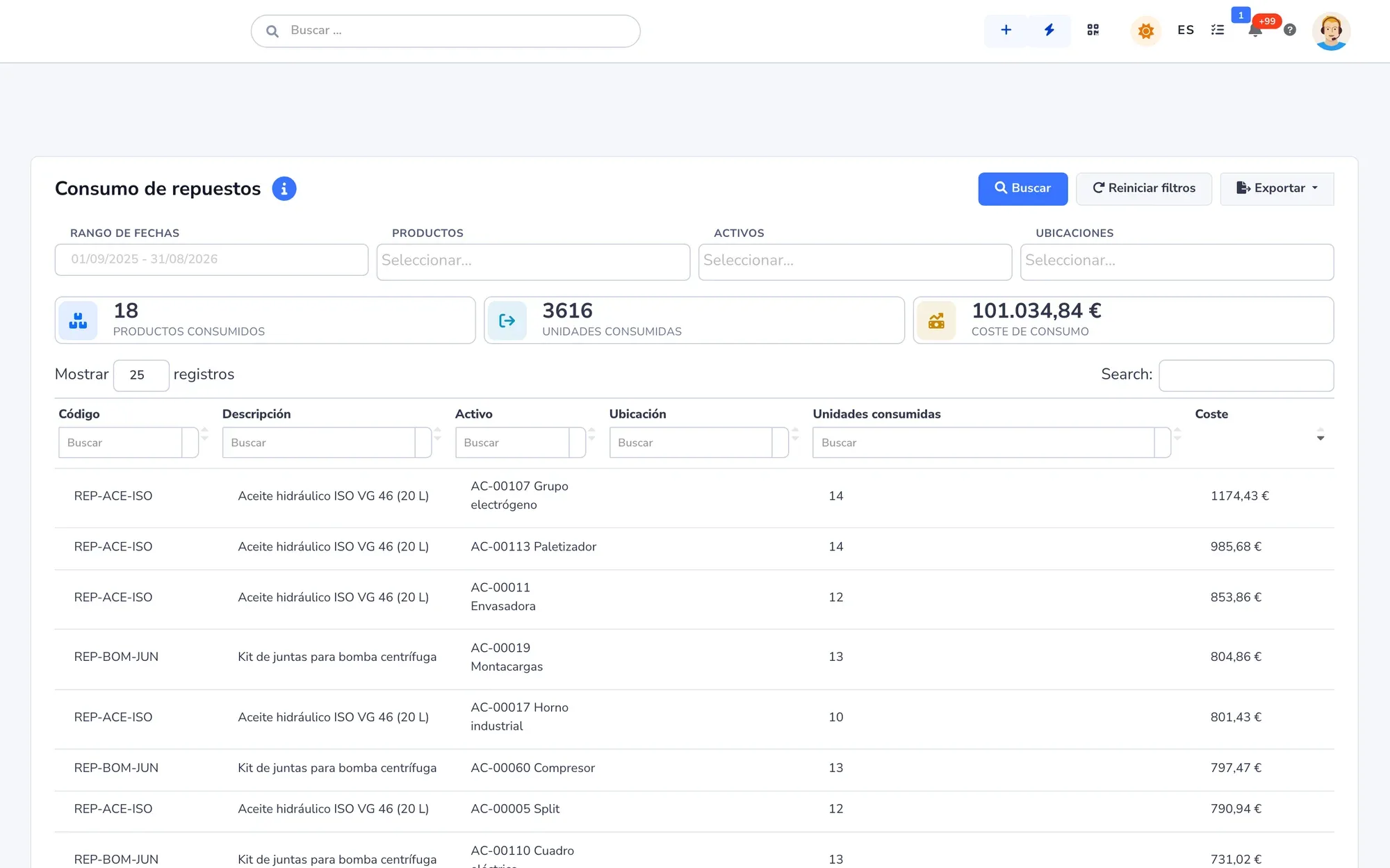
- Project cost, added up live
- Cloud-based: nothing to install
- Data hosted in the European Union
- Native iOS and Android app
- AI proposes; you decide
Request a demo with your data
We call you, look at your case and show you attendo with your own data. No commitment.
If this sounds familiar, read on
You find out the margin when it is too late to fix it
The plan lives in a Gantt chart only one person updates, hours arrive on timesheets at month end and drawings sit in a shared folder. By the time the costs add up, the project is over.
- Behind schedule
Dates that slip with nothing to compare
Nobody measures the plan against what was approved. The variance shows up at the closing meeting.
- Overbooked
Three projects waiting on the same person
Dates get promised without seeing anyone’s workload.
- Not logged
Hours logged from memory
They arrive at month end, and the real cost is known when it is too late to correct.
- Not documented
Scattered documents
Drawings, minutes, photos and signatures in emails and folders. Anyone joining mid-project starts from scratch.
What it does
Plan, team, cost and documents on the same project
From kickoff to handover, without moving data from one tool to another.
-
Gantt chart with a baseline
Project, phases, line items and documents in one view, with dependencies and lag or lead in days. The baseline keeps the approved plan.
-
Team workload
The planned hours on each document against each person’s actual working hours, holidays and time off included, by day, week or month.
-
Logged hours
Each person logs time to the document they are working on, from desktop or the app. And, if you need it, attendance tracking with clock-ins.
-
Costs and profitability
Hours at their rate, expenses and materials add up on the project as the work happens. Profitability is shown per project, per customer or per contract.
-
Multi-user whiteboards
Notes, drawings, charts and images with everyone’s cursor live, links to documents and people, history and named versions.
-
Project documents
Drawings, minutes, photos and contracts hang from the work they document, with tags, search and malware scanning.
-
Signature and fingerprint
Contracts and handover reports signed with attendo eSign, and the fingerprint of every signed document stored on the blockchain.
-
Customers and subcontractors
Customers see their own records in the portal, and each subcontractor receives and closes their jobs in the supplier portal. No license needed.
How it works
From kickoff to handover
Six steps on the same project, in the order they happen.
- Step 1
You create the project
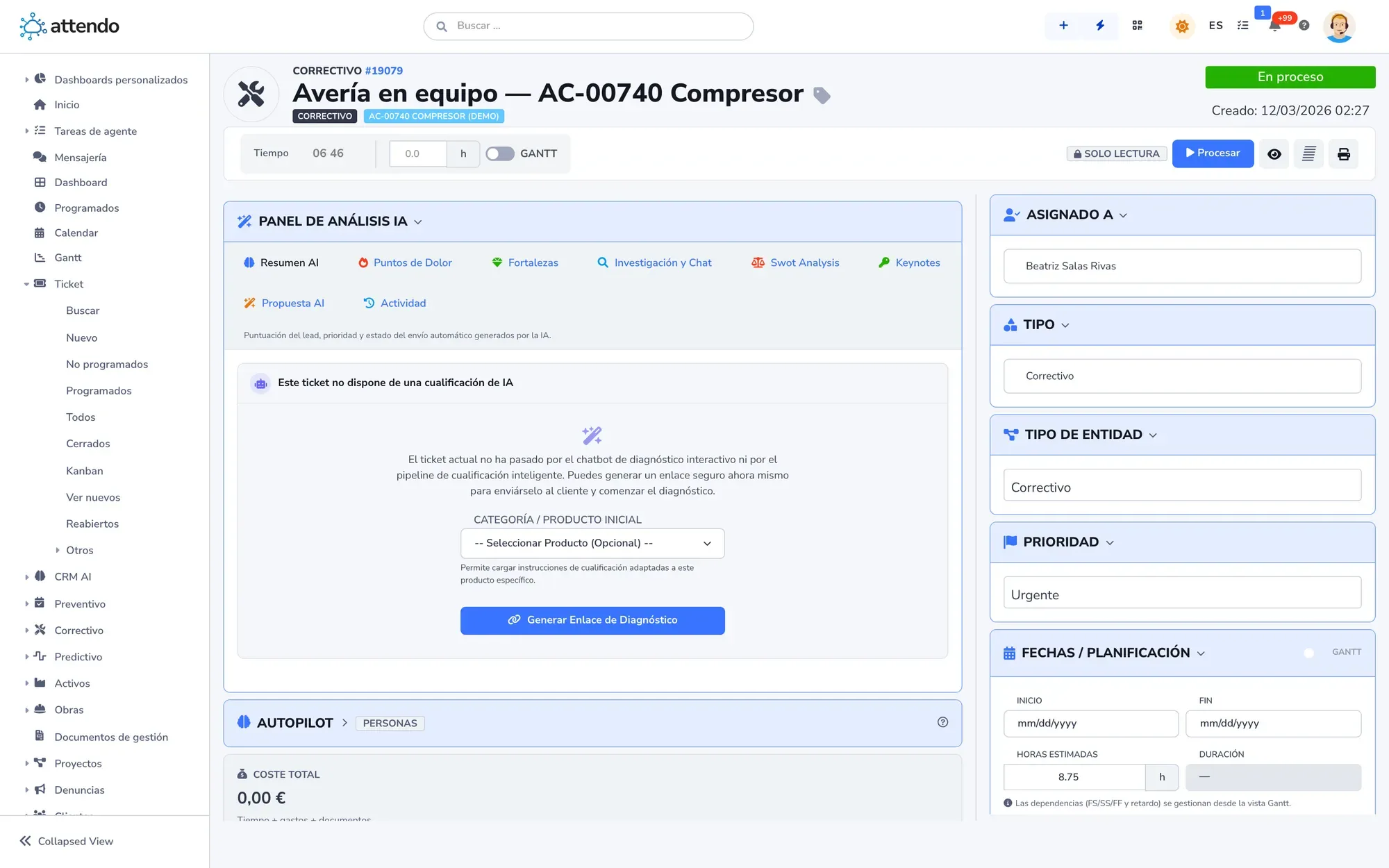
With its phases, its line items and one document per piece of work, each with its owner.
- Step 2
You schedule it
Dates, estimated hours, dependencies and owners on the Gantt chart, with the team’s workload in view.
- Step 3
You set the baseline
You save the approved plan. From then on, every variance is measured against what was promised.
- Step 4
The team works and logs time
Tasks, checklist and report on each document, with hours, expenses and materials from desktop or mobile.
- Step 5
You track progress and margin
Progress comes from closed documents and cost adds up live.
- Step 6
You hand over with a signature
The customer signs the handover report. What you installed can move to maintenance with attendo CMMS, on the same system.
Artificial intelligence
marIA in your projects
attendo’s AI knows each project’s history. It proposes; a person decides.
-
Summarizes meetings
Teams or Meet meetings are recorded and transcribed on the project, and marIA summarizes what was agreed.
-
Answers questions about your data
“Which projects have gone over their hours?” In plain language, read-only, with the source of every answer.
-
Searches the documentation
It answers citing the specifications, drawings and procedures you have uploaded.
-
Drafts the reply
The reply to the customer, with the project history in view. A person sends it.
What it does not do: schedule, assign or move dates. Without AI, attendo Projects works in full.
Before and after
From spreadsheets to project management software
What changes when the plan, the hours and the cost live in the same place.
| Spreadsheets, email and folders | attendo Projects | |
|---|---|---|
| Plan | Spreadsheets, email and foldersA Gantt chart one person updates | attendo ProjectsGantt chart with dependencies and baseline |
| Team workload | Spreadsheets, email and foldersYou find out when someone falls behind | attendo ProjectsWorkload based on actual working hours |
| Hours | Spreadsheets, email and foldersTimesheets at month end | attendo ProjectsLogged to each document as the work happens |
| Cost and margin | Spreadsheets, email and foldersAt closing, if at all | attendo ProjectsHours, expenses and materials added up live |
| Documents and signatures | Spreadsheets, email and foldersIn emails and folders | attendo ProjectsOn the project, with signature and blockchain fingerprint |
| After handover | Spreadsheets, email and foldersIn another program | attendo ProjectsMaintenance and support on the same platform |
Integrations
Connected to what you already use
With a native connector, the project’s billable items go to your connected ERP, which issues the invoice. With humaneo, also native, you round out people management, except payroll. And meetings happen in Teams or Meet.
- Odoo
- SAP Business One
- Business Central
- Holded
- humaneo
- Microsoft 365
- Microsoft Teams
- Google Meet
- API v4
Who it is for
For any company, in any industry
These are the most common industries. attendo can be set up for any other: your customer types, your fields and your vocabulary.
Frequently asked questions
Frequently asked questions
What is project management software?
It is the software that brings together each project’s plan, team, cost and documents: dates and dependencies, who does what, how many hours it has taken and what it costs. attendo adds signatures, the customer portal and what happens after handover.
Is it only for construction?
No. It works for any project: an installation, a software rollout, a plant shutdown, a store opening or a consulting engagement. Phases and line items are one way to organize it, not a requirement.
Can I see the margin while the project is running?
Yes. Hours at their rate, expenses and materials add up as they are logged, and profitability is shown per project.
Does attendo invoice the project?
No. attendo is not an ERP or accounting software: it prepares what is billable (hours, materials, orders and delivery notes) and passes it to your connected ERP, which issues the invoice. There are native connectors for Odoo, SAP Business One, Business Central and Holded.
Can the team work from their phones?
Yes, with the iOS and Android app: tasks, checklists, photos, signatures and hours, offline too. The Gantt chart, portfolio and workload are desktop screens.
Does it work for software development with sprints?
That is not what it is built for. For sprints, code issues and repositories, an agile development tool is the better fit.
Can my customers and subcontractors log in?
Yes, without a license. Customers see their own records in the portal and download what they signed; each subcontractor receives and closes their jobs in the supplier portal.
How much does it cost?
We do not publish prices: it depends on the modules you turn on and the people who use them. How much attendo costs explains what the price depends on, and we send you a firm proposal after looking at your case.
Request a demo
Bring a project in progress
Leave us your details and we will show you attendo with your phases, your people and your deadlines. If it is not a fit, we will tell you.
- With your operation, not a generic demo
- A real person from our team replies
- No cold calls afterwards
Would you rather talk first?
- Phone +34 902 750 677 · +34 910 053 530
- Email sales@attendo.me
- Monday to Thursday 9:30 AM to 6:30 PM and Friday 9:30 AM to 2:30 PM (Spain time)